

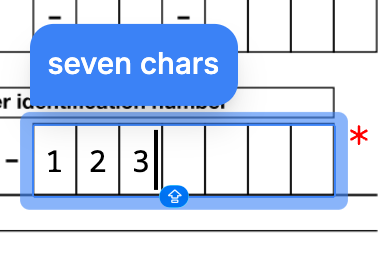
Boxed text input places are only available in envelopes with sequential signing.
Box Count
Thebox_count property sets how many individual character boxes appear. Set this value based on the expected input length.
Hints and Prompts
Usehint and prompt to guide recipients while filling in the boxes.
hint: A tooltip shown when the recipient hovers over or focuses on the field.prompt: Placeholder text displayed inside the first box.
Capturing Input
Setcapture_as to store the entered value in the envelope’s captures object. After the envelope is completed, retrieve the value using the key you specified.
Size and Appearance
width: The total width of the field in points (1/72 inch). Must be between 30 and 540. Defaults to 30.height: The height of each box in points (1/72 inch). Must be between 6 and 60.font_size: The text size inside each box, in points. Must be between 6 and 12. Defaults to 12.
Attributes
enum
required
Specifies the type of place.For a boxed text input place, the value must be
boxed_text_input.string
required
A unique identifier for this place within the document. Use this key to match the place to its position, either through a
[[place_key]] placeholder in the document or an entry in fixed_positions.Must start with a lowercase letter and contain only lowercase letters, numbers, and underscores. Maximum 32 characters.string
required
The key of the recipient assigned to this place. Must match one of the
key values in the envelope’s recipients array.number
The number of individual character boxes to display.Must be between 1 and 100. Each box accepts a single character from the recipient.
string
A key that stores the recipient’s input in the envelope’s
captures object. When set, the value entered or selected by the recipient is saved under this key after the envelope is completed.Must start with a lowercase letter and contain only lowercase letters, numbers, and underscores. Maximum 32 characters. Set to null to disable capture.string
A tooltip message displayed over the boxed text input field during the signing ceremony.Learn more in Hints and Prompts.
string
A placeholder message shown inside the first box during the signing ceremony to guide the recipient.Learn more in Hints and Prompts.
enum
Specifies whether the recipient must fill all boxes to complete the signing ceremony.Possible values are
required or optional. The default is required.number
required
The total width of the boxed input field in .Must be between 30 and 540. The default is 30.
number
required
The height of each individual box in .
number
required
The font size in .Must be between 6 and 12. The default is 12.