> ## Documentation Index
> Fetch the complete documentation index at: https://signatureapi-daf4ee54.mintlify.site/llms.txt
> Use this file to discover all available pages before exploring further.
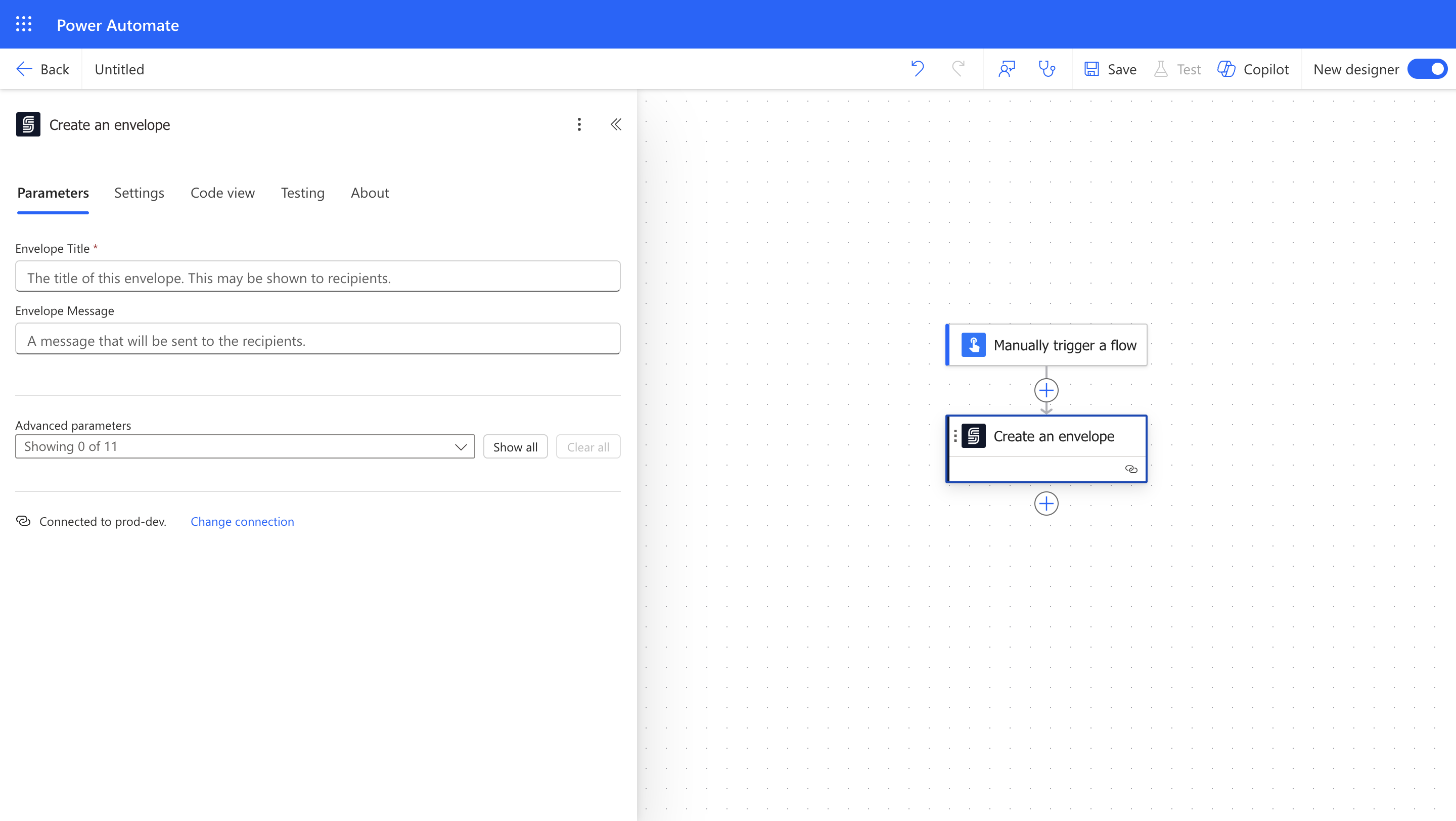
# Create an envelope
> Creates a new envelope to which you can add recipients and documents.
 ### Input
The title of this envelope. This may be shown to recipients.
A message to include in emails to recipients.
Custom label given to the envelope for easier identification. Labels are for internal use and are not shown to recipients.
The order in which recipients sign the envelope. It can be `parallel`, where all recipients can sign simultaneously, or `sequential`, where recipients sign one after another.
The default language to be used in the signing ceremony and deliverables. If not specified, the account's default language is used.
[Learn more about languages](/docs/integrations/power-automate/envelopes/language).
The time zone to be used for timestamps in deliverables. The names should be the timezone identifiers in the IANA Time Zone Database. If not specified, the account's default timezone offset is used.
[Learn more about time zones](/docs/integrations/power-automate/envelopes/timezone).
The date and time format to be used in timestamps for deliverables. If not specified, the account's default timestamp format is used.
[Learn more about time zones](/docs/integrations/power-automate/envelopes/timestamp-format).
The name of the sender. This overrides the account default sender name.
The name of the sender of the envelope. This overrides the account default sender email.
Extra properties for extensibility.
Envelope mode can be either `live` or `test`. In test mode, envelopes are non-binding, free, and do not send real emails. You can view these emails in the dashboard.
Specifies the regulatory or compliance attestation applied to a completed envelope. Attestations are optional and used to ensure adherence to specific legal or regulatory standards. It can be `none` or `mx_nom151`.
* mx\_nom151: To comply with Mexican NOM-151, which governs the preservation of data integrity, a *Constancia de Conservación* is generated for the Deliverable.
Use to classify envelopes and filter webhook notifications.
### Output
The title of the envelope. This may be shown to recipients.
A message to include in emails to recipients.
The name of the sender of the envelope. This overrides the account default sender name.
The email address of the sender of the envelope. This overrides the account default sender email.
The ID of the envelope.
Whether the envelope is in `live` or `test` mode. Test mode envelopes are non-binding and not billed.
Regulatory or compliance attestation.
Use to classify envelopes and filter webhook notifications.
Custom label given to the envelope for easier identification. Labels are for internal use and are not shown to recipients.
The order in which recipients sign the envelope. It can be parallel, where all recipients can sign simultaneously, or sequential, where recipients sign one after another.
The time zone to be used for timestamps in deliverables.
The date and time format to be used in timestamps for deliverables.
### Input
The title of this envelope. This may be shown to recipients.
A message to include in emails to recipients.
Custom label given to the envelope for easier identification. Labels are for internal use and are not shown to recipients.
The order in which recipients sign the envelope. It can be `parallel`, where all recipients can sign simultaneously, or `sequential`, where recipients sign one after another.
The default language to be used in the signing ceremony and deliverables. If not specified, the account's default language is used.
[Learn more about languages](/docs/integrations/power-automate/envelopes/language).
The time zone to be used for timestamps in deliverables. The names should be the timezone identifiers in the IANA Time Zone Database. If not specified, the account's default timezone offset is used.
[Learn more about time zones](/docs/integrations/power-automate/envelopes/timezone).
The date and time format to be used in timestamps for deliverables. If not specified, the account's default timestamp format is used.
[Learn more about time zones](/docs/integrations/power-automate/envelopes/timestamp-format).
The name of the sender. This overrides the account default sender name.
The name of the sender of the envelope. This overrides the account default sender email.
Extra properties for extensibility.
Envelope mode can be either `live` or `test`. In test mode, envelopes are non-binding, free, and do not send real emails. You can view these emails in the dashboard.
Specifies the regulatory or compliance attestation applied to a completed envelope. Attestations are optional and used to ensure adherence to specific legal or regulatory standards. It can be `none` or `mx_nom151`.
* mx\_nom151: To comply with Mexican NOM-151, which governs the preservation of data integrity, a *Constancia de Conservación* is generated for the Deliverable.
Use to classify envelopes and filter webhook notifications.
### Output
The title of the envelope. This may be shown to recipients.
A message to include in emails to recipients.
The name of the sender of the envelope. This overrides the account default sender name.
The email address of the sender of the envelope. This overrides the account default sender email.
The ID of the envelope.
Whether the envelope is in `live` or `test` mode. Test mode envelopes are non-binding and not billed.
Regulatory or compliance attestation.
Use to classify envelopes and filter webhook notifications.
Custom label given to the envelope for easier identification. Labels are for internal use and are not shown to recipients.
The order in which recipients sign the envelope. It can be parallel, where all recipients can sign simultaneously, or sequential, where recipients sign one after another.
The time zone to be used for timestamps in deliverables.
The date and time format to be used in timestamps for deliverables.