> ## Documentation Index
> Fetch the complete documentation index at: https://signatureapi-daf4ee54.mintlify.site/llms.txt
> Use this file to discover all available pages before exploring further.
# Embedding in a Web Application
> Embed the SignatureAPI signing interface in your web app using an iframe
To embed the signing interface in your web app, first get a [ceremony URL](/docs/api/resources/ceremonies/ceremony-url).
## The ceremony URL
Add two query parameters to the ceremony URL:
* `embedded=true` -> Configures the UI for embedding and specifies allowed sources for the `frame-ancestors` directive of the CSP.
* `event_delivery=message` -> Sends [ceremony events](/docs/embedded/ceremony-events) (like ceremony completion) as [Javascript messages](/docs/embedded/ceremony-events#javascript-messages).
Example URL with both query parameters:
https\://sign.signatureapi.com/en/start?token=eyJhbGciOiJFUzI1NiIsInR5cCI6IkpXVCJ9.eyJpYXQiOjE3MjI4OTE3NDYsImV4cCI6MTcyMzQ5NjU0NiwiY2VyZW1vbnlf\&embedded=true\&event\_delivery=message
## The \
```
## Testing with Embedder
To help you test ceremony embedding before implementing it in your application, we provide an **Embedder** tool. This tool allows you to quickly preview how your ceremony will appear inside an iframe.
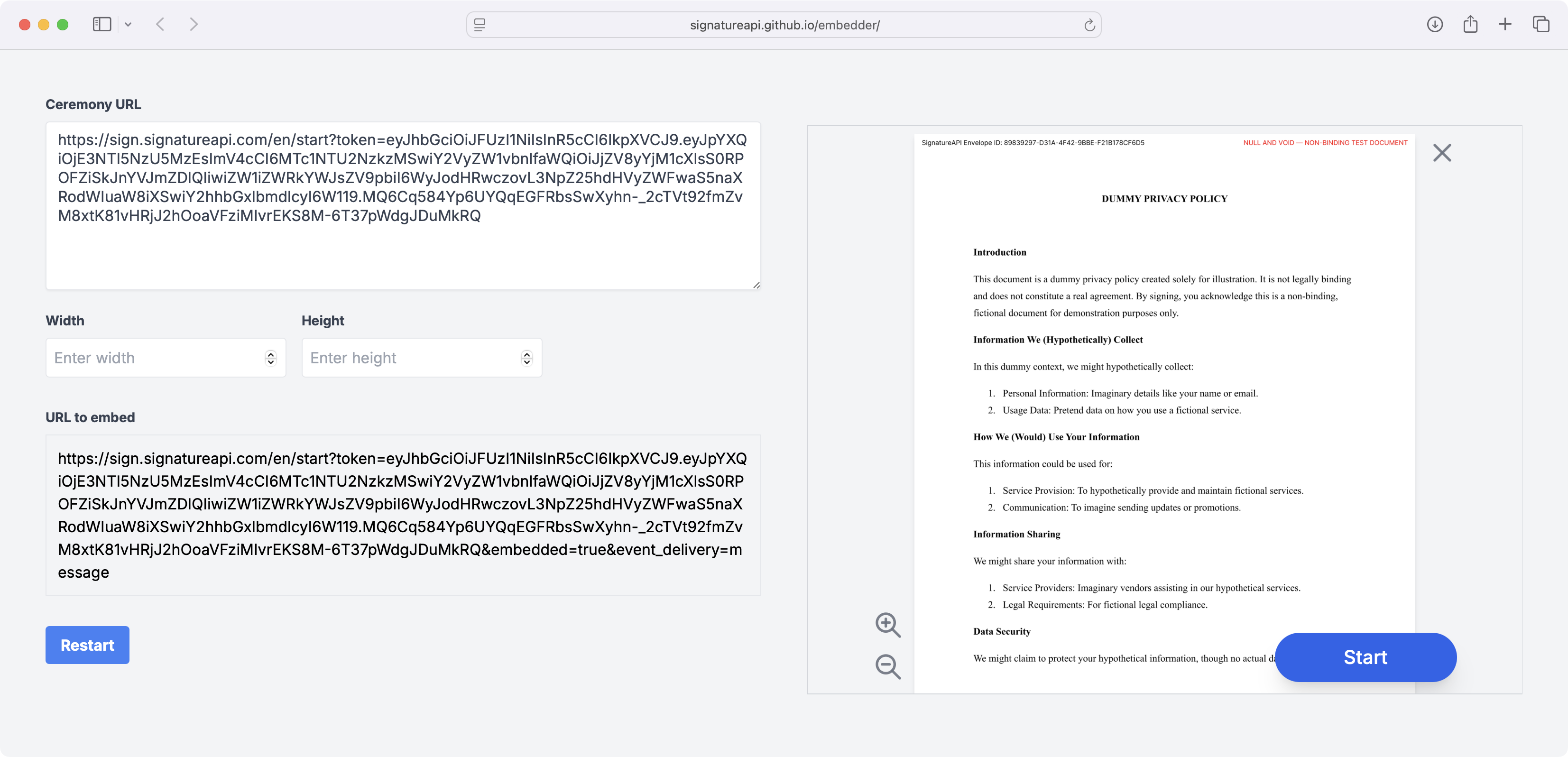 To use the embedder, follow these steps:
1. Go to the [Embedder Tool](https://signatureapi.github.io/embedder/)
2. Enter your [ceremony URL](/docs/api/resources/ceremonies/ceremony-url) (the `embedded=true` and `event_delivery=message` query parameters are added automatically)
3. Optionally, adjust the width and height values in pixels
4. The tool will display your ceremony in an iframe with the specified dimensions
## Listening to events
The embedded ceremony sends JavaScript [MessageEvent](https://developer.mozilla.org/en-US/docs/Web/API/MessageEvent)s for [events happening inside the ceremony](/docs/embedded/introduction#event-types).
Your app can listen to these events and take actions, such as closing the iframe when the ceremony is completed. Here’s an example of how to listen to these events:
```js theme={null}
// Function to handle the ceremony completed event
function handleCeremonyCompleted(event) {
console.log("Ceremony completed successfully.");
}
// Function to handle the ceremony canceled event
function handleCeremonyCanceled(event) {
console.log("Ceremony was canceled by the user.");
}
// Function to handle the ceremony failed event
function handleCeremonyFailed(event) {
const { error_type, error_message } = event.data;
console.error(`Ceremony failed with error: ${error_type} - ${error_message}`);
}
// Function to handle incoming message events
function handleMessage(event) {
const { type } = event.data;
switch (type) {
case 'ceremony.completed':
handleCeremonyCompleted(event);
break;
case 'ceremony.canceled':
handleCeremonyCanceled(event);
break;
case 'ceremony.failed':
handleCeremonyFailed(event);
break;
default:
console.warn(`Unknown event type: ${type}`);
}
}
// Add event listener to window for message events
window.addEventListener('message', handleMessage, false);
```
## Troubleshooting
### CSP frame-ancestors error
If the browser refuses to load the iframe and you see an error like this in the console:
> Refused to frame ... because an ancestor violates the following Content Security Policy directive: "frame-ancestors none".
Check the following:
* **`embedded=true` query parameter is present.** Without it, the correct CSP headers are not set and the browser blocks the iframe.
* **`embeddable_in` is set correctly.** The array must include the exact origin where your app is hosted (for example, `https://app.example.com`). Include the protocol (`https://`) and omit trailing slashes or paths.
* **Localhost testing.** Use `http://localhost:3000` (with your port number) in `embeddable_in` during development.
* **Multiple origins.** If your app runs on multiple domains, include all of them in the `embeddable_in` array.
To isolate the issue, you can temporarily set `embeddable_in` to `["*"]`:
```json theme={null}
// POST https://api.signatureapi.com/v1/recipients/{recipient_id}/ceremonies
// X-API-Key: key_test_...
// Content-Type: application/json
{
"authentication": [
//...
],
"embeddable_in": [
"*"
]
}
```
Do not use the `*` wildcard in production. It allows any website to embed your signing ceremony, which is a security risk.
To use the embedder, follow these steps:
1. Go to the [Embedder Tool](https://signatureapi.github.io/embedder/)
2. Enter your [ceremony URL](/docs/api/resources/ceremonies/ceremony-url) (the `embedded=true` and `event_delivery=message` query parameters are added automatically)
3. Optionally, adjust the width and height values in pixels
4. The tool will display your ceremony in an iframe with the specified dimensions
## Listening to events
The embedded ceremony sends JavaScript [MessageEvent](https://developer.mozilla.org/en-US/docs/Web/API/MessageEvent)s for [events happening inside the ceremony](/docs/embedded/introduction#event-types).
Your app can listen to these events and take actions, such as closing the iframe when the ceremony is completed. Here’s an example of how to listen to these events:
```js theme={null}
// Function to handle the ceremony completed event
function handleCeremonyCompleted(event) {
console.log("Ceremony completed successfully.");
}
// Function to handle the ceremony canceled event
function handleCeremonyCanceled(event) {
console.log("Ceremony was canceled by the user.");
}
// Function to handle the ceremony failed event
function handleCeremonyFailed(event) {
const { error_type, error_message } = event.data;
console.error(`Ceremony failed with error: ${error_type} - ${error_message}`);
}
// Function to handle incoming message events
function handleMessage(event) {
const { type } = event.data;
switch (type) {
case 'ceremony.completed':
handleCeremonyCompleted(event);
break;
case 'ceremony.canceled':
handleCeremonyCanceled(event);
break;
case 'ceremony.failed':
handleCeremonyFailed(event);
break;
default:
console.warn(`Unknown event type: ${type}`);
}
}
// Add event listener to window for message events
window.addEventListener('message', handleMessage, false);
```
## Troubleshooting
### CSP frame-ancestors error
If the browser refuses to load the iframe and you see an error like this in the console:
> Refused to frame ... because an ancestor violates the following Content Security Policy directive: "frame-ancestors none".
Check the following:
* **`embedded=true` query parameter is present.** Without it, the correct CSP headers are not set and the browser blocks the iframe.
* **`embeddable_in` is set correctly.** The array must include the exact origin where your app is hosted (for example, `https://app.example.com`). Include the protocol (`https://`) and omit trailing slashes or paths.
* **Localhost testing.** Use `http://localhost:3000` (with your port number) in `embeddable_in` during development.
* **Multiple origins.** If your app runs on multiple domains, include all of them in the `embeddable_in` array.
To isolate the issue, you can temporarily set `embeddable_in` to `["*"]`:
```json theme={null}
// POST https://api.signatureapi.com/v1/recipients/{recipient_id}/ceremonies
// X-API-Key: key_test_...
// Content-Type: application/json
{
"authentication": [
//...
],
"embeddable_in": [
"*"
]
}
```
Do not use the `*` wildcard in production. It allows any website to embed your signing ceremony, which is a security risk.