> ## Documentation Index
> Fetch the complete documentation index at: https://signatureapi-daf4ee54.mintlify.site/llms.txt
> Use this file to discover all available pages before exploring further.
# Browse Envelopes
> View, filter, and manage envelopes from the Dashboard.
The Envelopes page lists all [envelopes](/docs/api/resources/envelopes/object) in your account. Use it to monitor signing progress, inspect envelope details, and take actions like canceling or downloading [deliverables](/docs/api/resources/deliverables/object).
To view your envelopes, go to [Envelopes](https://dashboard.signatureapi.com/envelopes) in the Dashboard.
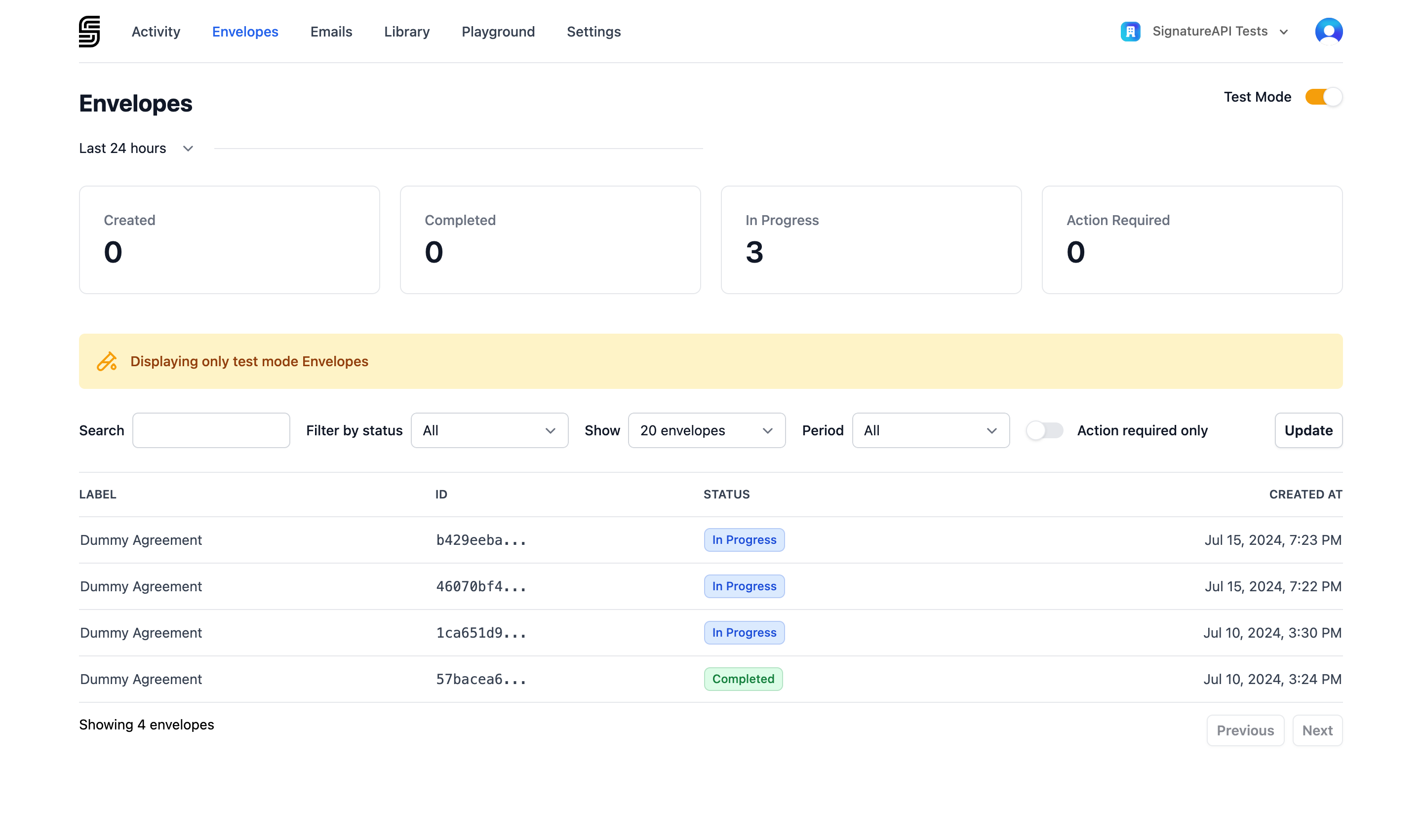 Toggle **Test Mode** in the top-right corner to switch between test and live envelopes.
## Filtering envelopes
Use **Filter by status** to narrow the list to envelopes in a specific state:
| Status | Description |
| :---------- | :--------------------------------------------------------------------------------- |
| Processing | The envelope is being prepared. Documents are validated and recipients are queued. |
| In Progress | The envelope has been sent to recipients and is waiting for completion. |
| Completed | All recipients have completed the envelope. A deliverable has been generated. |
| Failed | An internal error occurred during processing. |
| Canceled | The signing process was stopped before completion. |
Learn more about the [envelope lifecycle](/docs/api/resources/envelopes/lifecycle).
## Envelope details
Click any envelope in the list to view its full details.
Toggle **Test Mode** in the top-right corner to switch between test and live envelopes.
## Filtering envelopes
Use **Filter by status** to narrow the list to envelopes in a specific state:
| Status | Description |
| :---------- | :--------------------------------------------------------------------------------- |
| Processing | The envelope is being prepared. Documents are validated and recipients are queued. |
| In Progress | The envelope has been sent to recipients and is waiting for completion. |
| Completed | All recipients have completed the envelope. A deliverable has been generated. |
| Failed | An internal error occurred during processing. |
| Canceled | The signing process was stopped before completion. |
Learn more about the [envelope lifecycle](/docs/api/resources/envelopes/lifecycle).
## Envelope details
Click any envelope in the list to view its full details.
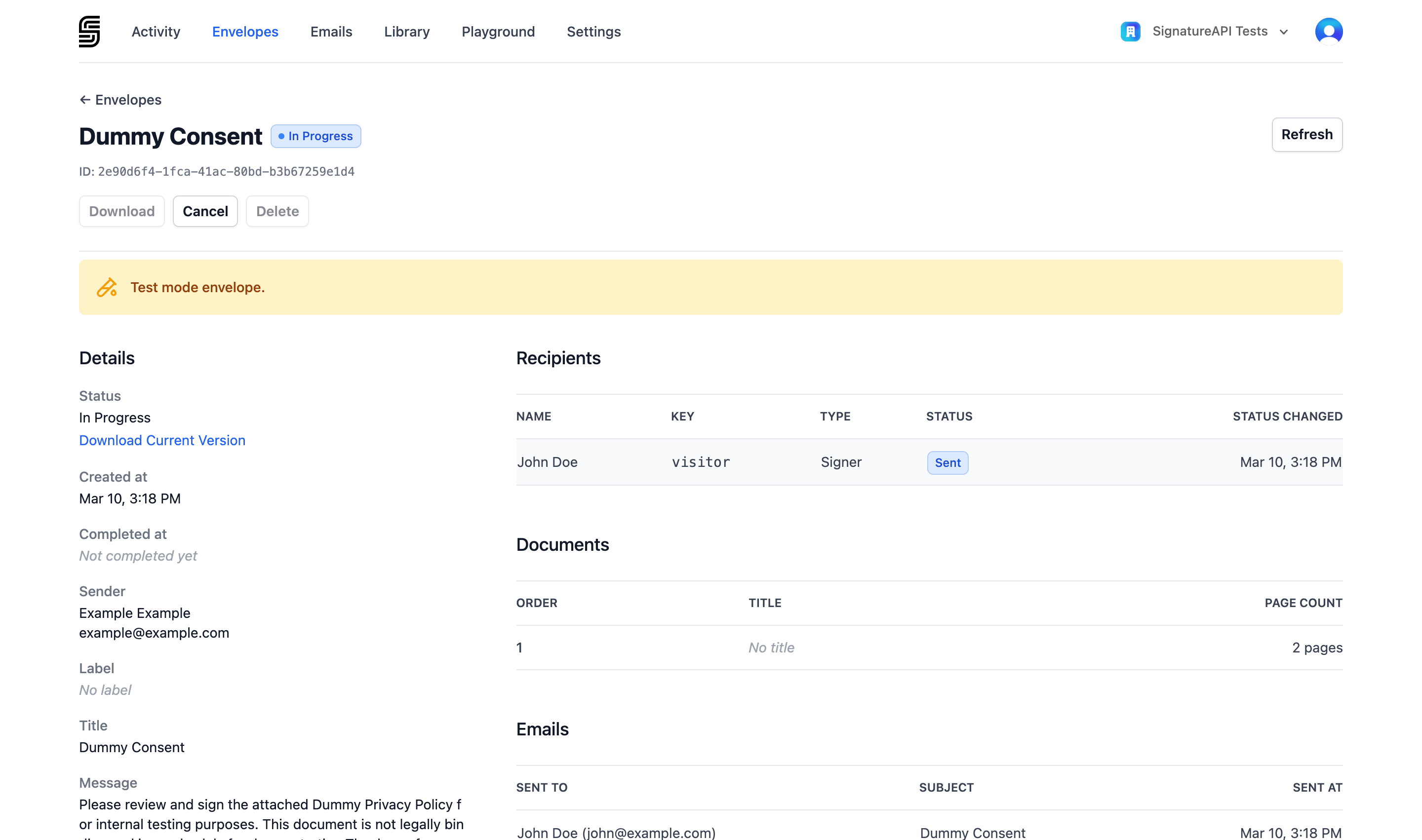 The detail page is organized into the following sections:
### Details
Shows the envelope's properties — created at, completed at, [sender](/docs/api/resources/senders/object), label, title, message, [language](/docs/api/resources/envelopes/language), [time zone](/docs/api/resources/envelopes/timezone), and [timestamp format](/docs/api/resources/envelopes/timestamp-format).
On in progress envelopes, the **Details** section also includes the **Download Current Version** button, which lets you download a PDF of the current state of the envelope. This is useful for reviewing the documents and any signatures collected so far.
### Recipients
Lists each [recipient](/docs/api/resources/recipients/object) with their name, key, type ([signer](/docs/api/resources/recipients/signer), [approver](/docs/api/resources/recipients/approver), or [preparer](/docs/api/resources/recipients/preparer)), current status, and the time their status last changed.
### Documents
Lists the [documents](/docs/api/resources/documents/object) included in the envelope with their order, title, and page count.
### Emails
Lists the emails sent for this envelope. Click any email to open it in the [Email Inspector](/docs/dashboard/emails) for full details, attachments, and delivery reports.
## Envelope actions
The detail page provides action buttons depending on the envelope's status:
* **Download** — download the [deliverable](/docs/api/resources/deliverables/object) PDF once the envelope is completed. Available on `completed` envelopes.
* **Cancel** — permanently stop the signing process. Available on `in_progress` envelopes. This action is irreversible. See [Cancel an envelope](/docs/api/resources/envelopes/cancel).
* **Delete** — remove the envelope from your account. Available on `completed`, `failed`, and `canceled` envelopes.
You need the **Manage envelopes** permission to view and manage envelopes. See [Manage Team Members](/docs/dashboard/users) for details on roles and permissions.
The detail page is organized into the following sections:
### Details
Shows the envelope's properties — created at, completed at, [sender](/docs/api/resources/senders/object), label, title, message, [language](/docs/api/resources/envelopes/language), [time zone](/docs/api/resources/envelopes/timezone), and [timestamp format](/docs/api/resources/envelopes/timestamp-format).
On in progress envelopes, the **Details** section also includes the **Download Current Version** button, which lets you download a PDF of the current state of the envelope. This is useful for reviewing the documents and any signatures collected so far.
### Recipients
Lists each [recipient](/docs/api/resources/recipients/object) with their name, key, type ([signer](/docs/api/resources/recipients/signer), [approver](/docs/api/resources/recipients/approver), or [preparer](/docs/api/resources/recipients/preparer)), current status, and the time their status last changed.
### Documents
Lists the [documents](/docs/api/resources/documents/object) included in the envelope with their order, title, and page count.
### Emails
Lists the emails sent for this envelope. Click any email to open it in the [Email Inspector](/docs/dashboard/emails) for full details, attachments, and delivery reports.
## Envelope actions
The detail page provides action buttons depending on the envelope's status:
* **Download** — download the [deliverable](/docs/api/resources/deliverables/object) PDF once the envelope is completed. Available on `completed` envelopes.
* **Cancel** — permanently stop the signing process. Available on `in_progress` envelopes. This action is irreversible. See [Cancel an envelope](/docs/api/resources/envelopes/cancel).
* **Delete** — remove the envelope from your account. Available on `completed`, `failed`, and `canceled` envelopes.
You need the **Manage envelopes** permission to view and manage envelopes. See [Manage Team Members](/docs/dashboard/users) for details on roles and permissions.