> ## Documentation Index
> Fetch the complete documentation index at: https://signatureapi-daf4ee54.mintlify.site/llms.txt
> Use this file to discover all available pages before exploring further.
# Sender
> A sender is a verified email address that SignatureAPI uses when sending signing requests to recipients
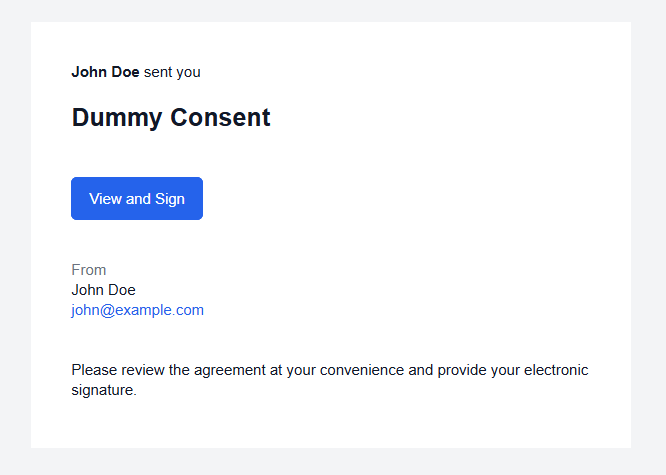
A sender is a verified email address. SignatureAPI sends signing request emails to recipients on behalf of the sender's address. The sender's name, email address, and organization appear in every email sent to recipients, and the sender's address is used as the Reply-To address.
Before an email address can be used as a sender, the address owner must complete email verification. SignatureAPI initiates this by sending a verification email when you create the sender.
 ## Verification lifecycle
A sender goes through a verification process before it can be used. See the [sender lifecycle](/docs/api/resources/senders/lifecycle) for details.
## Managing senders
You can manage senders in the [Dashboard](https://dashboard.signatureapi.com/settings/senders) under Settings, or programmatically using the API.
Sender management via API is currently in public preview. To enable it, contact [support](https://signatureapi.com/support).
**Dashboard.** When you created your SignatureAPI account, a sender was automatically added using your account email address. That sender is already verified. To add a new sender, click **New Sender** in the Senders settings and enter the email address to verify.
**API.** Create a sender using the [Create a sender](/docs/api/resources/senders/create) endpoint. SignatureAPI sends the verification email automatically. Listen for the [`sender.verified`](/docs/api/resources/events/sender-events#sender.verified) or [`sender.failed`](/docs/api/resources/events/sender-events#sender.failed) webhook events to track the outcome.
## Default sender
Every account has a default sender. When you create an envelope without specifying a sender, SignatureAPI uses the default sender's name and email.
To change your account's default sender, click **Set default** next to the desired sender in the Dashboard.
To specify a sender explicitly on an envelope, include the `sender` property in the request body:
```json theme={null}
// POST https://api.signatureapi.com/v1/envelopes
// X-API-Key: key_test_...
// Content-Type: application/json
{
"title": "Consulting Agreement",
//...
"sender": {
"name": "Jennifer Lee",
"email": "jennifer@example.com",
"organization": "Acme Enterprises"
}
}
```
## Email addresses in signing requests
All signing request emails are sent from `noreply@signatureapi.com`. This cannot be changed. SignatureAPI enforces a strict DMARC policy to protect email deliverability across major email providers. Sending from custom domains would risk emails landing in spam or being rejected.
Your verified sender address appears as the **Reply-To** address, so recipient replies go directly to you. The sender's name and organization also appear in the email body.
To control the Reply-To address and sender details, [create and verify a sender](#managing-senders) with the desired email address, then assign it to envelopes or set it as your [default sender](#default-sender) or in the envelope request.
Sending from a custom domain is available exclusively as part of the branding package for enterprise customers with very high monthly volumes. Set the From address using the [`envelope.branding.email.from`](/docs/api/resources/envelopes/object#param-from) property. Contact [support](https://signatureapi.com/support) to discuss eligibility. However, consider this could affect email deliverability and it's exclusive to premium enterprise customers.
## Attributes
The unique identifier of the sender.
The email address of the sender. SignatureAPI sends signing request emails to recipients on behalf of this address.
The current verification status of the sender.
| Status | Description |
| ---------------------- | ----------------------------------------------------------------------------------------- |
| `pending_verification` | A verification email was sent. The address owner has not yet confirmed. |
| `verified` | The address owner confirmed the verification email. This sender can be used on envelopes. |
| `failed` | Verification failed due to a bounce or error. This sender cannot be used. |
The time at which the sender was created, formatted as an ISO 8601 timestamp.
```json Response theme={null}
{
"id": "a1b2c3d4-e5f6-7890-abcd-ef1234567890",
"email": "jennifer@example.com",
"status": "verified",
"created_at": "2025-01-01T00:00:00.000Z"
}
```
## Verification lifecycle
A sender goes through a verification process before it can be used. See the [sender lifecycle](/docs/api/resources/senders/lifecycle) for details.
## Managing senders
You can manage senders in the [Dashboard](https://dashboard.signatureapi.com/settings/senders) under Settings, or programmatically using the API.
Sender management via API is currently in public preview. To enable it, contact [support](https://signatureapi.com/support).
**Dashboard.** When you created your SignatureAPI account, a sender was automatically added using your account email address. That sender is already verified. To add a new sender, click **New Sender** in the Senders settings and enter the email address to verify.
**API.** Create a sender using the [Create a sender](/docs/api/resources/senders/create) endpoint. SignatureAPI sends the verification email automatically. Listen for the [`sender.verified`](/docs/api/resources/events/sender-events#sender.verified) or [`sender.failed`](/docs/api/resources/events/sender-events#sender.failed) webhook events to track the outcome.
## Default sender
Every account has a default sender. When you create an envelope without specifying a sender, SignatureAPI uses the default sender's name and email.
To change your account's default sender, click **Set default** next to the desired sender in the Dashboard.
To specify a sender explicitly on an envelope, include the `sender` property in the request body:
```json theme={null}
// POST https://api.signatureapi.com/v1/envelopes
// X-API-Key: key_test_...
// Content-Type: application/json
{
"title": "Consulting Agreement",
//...
"sender": {
"name": "Jennifer Lee",
"email": "jennifer@example.com",
"organization": "Acme Enterprises"
}
}
```
## Email addresses in signing requests
All signing request emails are sent from `noreply@signatureapi.com`. This cannot be changed. SignatureAPI enforces a strict DMARC policy to protect email deliverability across major email providers. Sending from custom domains would risk emails landing in spam or being rejected.
Your verified sender address appears as the **Reply-To** address, so recipient replies go directly to you. The sender's name and organization also appear in the email body.
To control the Reply-To address and sender details, [create and verify a sender](#managing-senders) with the desired email address, then assign it to envelopes or set it as your [default sender](#default-sender) or in the envelope request.
Sending from a custom domain is available exclusively as part of the branding package for enterprise customers with very high monthly volumes. Set the From address using the [`envelope.branding.email.from`](/docs/api/resources/envelopes/object#param-from) property. Contact [support](https://signatureapi.com/support) to discuss eligibility. However, consider this could affect email deliverability and it's exclusive to premium enterprise customers.
## Attributes
The unique identifier of the sender.
The email address of the sender. SignatureAPI sends signing request emails to recipients on behalf of this address.
The current verification status of the sender.
| Status | Description |
| ---------------------- | ----------------------------------------------------------------------------------------- |
| `pending_verification` | A verification email was sent. The address owner has not yet confirmed. |
| `verified` | The address owner confirmed the verification email. This sender can be used on envelopes. |
| `failed` | Verification failed due to a bounce or error. This sender cannot be used. |
The time at which the sender was created, formatted as an ISO 8601 timestamp.
```json Response theme={null}
{
"id": "a1b2c3d4-e5f6-7890-abcd-ef1234567890",
"email": "jennifer@example.com",
"status": "verified",
"created_at": "2025-01-01T00:00:00.000Z"
}
```