> ## Documentation Index
> Fetch the complete documentation index at: https://signatureapi-daf4ee54.mintlify.site/llms.txt
> Use this file to discover all available pages before exploring further.
# Dropdown Place
> Add dropdown selection fields with predefined options for recipients to choose from
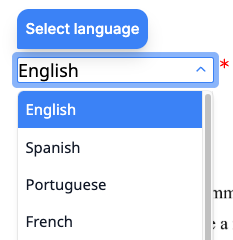
A **dropdown place** marks a location in a document where a recipient selects one option from a predefined list during the signing ceremony.
 Dropdown places are only available in envelopes with sequential signing.
You can position dropdown places using either [placeholders](/docs/api/resources/places/positioning/#placeholders) or [fixed positions](/docs/api/resources/places/positioning/#fixed-positions).
## Options
The `options` property defines the choices available in the dropdown. You can provide either custom options or a predefined option set.
### Custom options
Supply an array of objects. Each object requires a `label` (displayed to the recipient) and accepts an optional `value` (stored when the option is selected). If `value` is omitted, `label` is used as the stored value.
```json theme={null}
{
//...
"options": [
{ "label": "Full-time", "value": "full_time" },
{ "label": "Part-time", "value": "part_time" },
{ "label": "Contract", "value": "contract" }
]
//...
}
```
### Predefined option sets
For common selections like countries or US states, use a predefined option set by specifying one of these string values:
| Value | Description | Example values |
| -------------------------------- | ------------------------ | ------------------------------------ |
| `world_countries_names` | Full country names | "United States", "Canada", "Germany" |
| `world_countries_2_letter_codes` | ISO 3166-1 alpha-2 codes | "US", "CA", "DE" |
| `world_countries_3_letter_codes` | ISO 3166-1 alpha-3 codes | "USA", "CAN", "DEU" |
| `world_countries_numeric_codes` | ISO 3166-1 numeric codes | "840", "124", "276" |
| `us_states_names` | Full US state names | "California", "Texas", "New York" |
| `us_states_2_letter_codes` | US state abbreviations | "CA", "TX", "NY" |
```json theme={null}
{
//...
"options": "world_countries_names"
//...
}
```
## Default Selection
Use the `default` property to pre-select an option when the dropdown is displayed. The value is matched first against the `label` of each option, then against the `value`. If no match is found, a validation error is returned.
```json theme={null}
{
//...
"options": "us_states_names",
"default": "California"
//...
}
```
## Behavior
The `behavior` property controls how the dropdown is rendered during the signing ceremony.
| Behavior | Description |
| ---------------- | -------------------------------------------------------------------------------------------------------------- |
| `auto` (default) | Renders as a standard dropdown for 10 or fewer options, and as a searchable combobox for more than 10 options. |
| `select` | Always renders as a standard dropdown list. |
| `combobox` | Always renders as a searchable dropdown with type-ahead filtering. |
For large option sets like country lists, the `auto` behavior uses `combobox` since there are more than 10 options.
```json theme={null}
{
//...
"options": "world_countries_names",
"behavior": "combobox"
//...
}
```
## Hints and Prompts
Use `hint` and `prompt` to guide recipients while making their selection.
* **`hint`**: A tooltip shown when the recipient hovers over or focuses on the dropdown.
* **`prompt`**: Placeholder text shown inside the dropdown before a selection is made.
```json theme={null}
{
//...
"hint": "Select your country of residence",
"prompt": "Choose a country..."
//...
}
```
## Capturing Input
Set `capture_as` to store the selected value in the envelope's `captures` object. After the envelope is completed, retrieve the value using the key you specified.
## Size and Appearance
* **`width`**: The width of the dropdown field in points (1/72 inch). Must be between 30 and 540. Defaults to 30.
* **`font_size`**: The text size inside the dropdown, in points. Must be between 6 and 12. Defaults to 12.
## Attributes
Specifies the type of place.
For a dropdown place, the value must be `dropdown`.
A unique identifier for this place within the document. Use this key to match the place to its position, either through a `[[place_key]]` placeholder in the document or an entry in `fixed_positions`.
Must start with a lowercase letter and contain only lowercase letters, numbers, and underscores. Maximum 32 characters.
The key of the recipient assigned to this place. Must match one of the `key` values in the envelope's `recipients` array.
Specifies the list of options available in the dropdown.
You can provide either **custom options** or a **predefined option set**.
**Custom options**: An array of objects, each with a `label` (displayed to the user) and an optional `value` (captured when selected). If `value` is omitted, the `label` is used as the value.
```json theme={null}
"options": [
{ "label": "Option A", "value": "a" },
{ "label": "Option B", "value": "b" }
]
```
**Predefined options**: A string specifying a built-in option set:
| Value | Description |
| -------------------------------- | ----------------------------------------------- |
| `world_countries_names` | Country names (e.g., "United States", "Canada") |
| `world_countries_2_letter_codes` | ISO 3166-1 alpha-2 codes (e.g., "US", "CA") |
| `world_countries_3_letter_codes` | ISO 3166-1 alpha-3 codes (e.g., "USA", "CAN") |
| `world_countries_numeric_codes` | ISO 3166-1 numeric codes (e.g., "840", "124") |
| `us_states_names` | US state names (e.g., "California", "Texas") |
| `us_states_2_letter_codes` | US state codes (e.g., "CA", "TX") |
Specifies the option that is pre-selected when the dropdown is displayed.
The value is first matched against the `label` of each option. If no match is found, it is matched against the `value` of each option. If no match is found, a validation error is returned.
Specifies the behavior of the dropdown during the signing ceremony.
Possible values:
* `auto` (default): Automatically selects the best behavior based on the number of options. Uses `select` for 10 or fewer options, and `combobox` for more than 10 options.
* `select`: Displays a standard dropdown list. Best for short lists where users can quickly scan all options.
* `combobox`: Displays a searchable dropdown with type-ahead filtering. Best for long lists where users need to search for their selection.
Specifies whether the recipient must select an option to complete the signing ceremony.
Possible values are `required` or `optional`. The default is `required`.
A placeholder message shown inside the dropdown field during the signing ceremony.
Maximum length is 100 characters.
Learn more in [Hints and Prompts](/docs/api/resources/places/dropdown#hints-and-prompts).
A tooltip message displayed when the user hovers over or focuses on the dropdown field during the signing ceremony.
Maximum length is 100 characters.
Learn more in [Hints and Prompts](/docs/api/resources/places/dropdown#hints-and-prompts).
A key that stores the recipient's input in the envelope's `captures` object. When set, the value entered or selected by the recipient is saved under this key after the envelope is completed.
Must start with a lowercase letter and contain only lowercase letters, numbers, and underscores. Maximum 32 characters. Set to `null` to disable capture.
The font size in points.
Must be between 6 and 12. The default is 12.
The width of the dropdown field in points.
Must be between 30 and 540. The default is 30.
## Examples
```json Custom Options theme={null}
"documents": [
{
//...
"places": [
{
"key": "employment_type",
"type": "dropdown",
"recipient_key": "employee",
"options": [
{ "label": "Full-time", "value": "full_time" },
{ "label": "Part-time", "value": "part_time" },
{ "label": "Contract", "value": "contract" },
{ "label": "Internship", "value": "internship" }
],
"default": "Full-time",
"capture_as": "employment_type",
"prompt": "Select employment type",
"hint": "Choose the type of employment",
"requirement": "required",
"width": 150,
"font_size": 10
}
]
//...
}
]
```
```json Country Selection theme={null}
"documents": [
{
//...
"places": [
{
"key": "country_of_residence",
"type": "dropdown",
"recipient_key": "applicant",
"options": "world_countries_names",
"default": "United States",
"behavior": "combobox",
"capture_as": "country",
"prompt": "Select your country",
"hint": "Choose your country of residence",
"requirement": "required",
"width": 200,
"font_size": 10
}
]
//...
}
]
```
```json US State Selection theme={null}
"documents": [
{
//...
"places": [
{
"key": "state_selection",
"type": "dropdown",
"recipient_key": "customer",
"options": "us_states_2_letter_codes",
"capture_as": "state",
"prompt": "Select state",
"requirement": "required",
"width": 80,
"font_size": 10
}
]
//...
}
]
```
Dropdown places are only available in envelopes with sequential signing.
You can position dropdown places using either [placeholders](/docs/api/resources/places/positioning/#placeholders) or [fixed positions](/docs/api/resources/places/positioning/#fixed-positions).
## Options
The `options` property defines the choices available in the dropdown. You can provide either custom options or a predefined option set.
### Custom options
Supply an array of objects. Each object requires a `label` (displayed to the recipient) and accepts an optional `value` (stored when the option is selected). If `value` is omitted, `label` is used as the stored value.
```json theme={null}
{
//...
"options": [
{ "label": "Full-time", "value": "full_time" },
{ "label": "Part-time", "value": "part_time" },
{ "label": "Contract", "value": "contract" }
]
//...
}
```
### Predefined option sets
For common selections like countries or US states, use a predefined option set by specifying one of these string values:
| Value | Description | Example values |
| -------------------------------- | ------------------------ | ------------------------------------ |
| `world_countries_names` | Full country names | "United States", "Canada", "Germany" |
| `world_countries_2_letter_codes` | ISO 3166-1 alpha-2 codes | "US", "CA", "DE" |
| `world_countries_3_letter_codes` | ISO 3166-1 alpha-3 codes | "USA", "CAN", "DEU" |
| `world_countries_numeric_codes` | ISO 3166-1 numeric codes | "840", "124", "276" |
| `us_states_names` | Full US state names | "California", "Texas", "New York" |
| `us_states_2_letter_codes` | US state abbreviations | "CA", "TX", "NY" |
```json theme={null}
{
//...
"options": "world_countries_names"
//...
}
```
## Default Selection
Use the `default` property to pre-select an option when the dropdown is displayed. The value is matched first against the `label` of each option, then against the `value`. If no match is found, a validation error is returned.
```json theme={null}
{
//...
"options": "us_states_names",
"default": "California"
//...
}
```
## Behavior
The `behavior` property controls how the dropdown is rendered during the signing ceremony.
| Behavior | Description |
| ---------------- | -------------------------------------------------------------------------------------------------------------- |
| `auto` (default) | Renders as a standard dropdown for 10 or fewer options, and as a searchable combobox for more than 10 options. |
| `select` | Always renders as a standard dropdown list. |
| `combobox` | Always renders as a searchable dropdown with type-ahead filtering. |
For large option sets like country lists, the `auto` behavior uses `combobox` since there are more than 10 options.
```json theme={null}
{
//...
"options": "world_countries_names",
"behavior": "combobox"
//...
}
```
## Hints and Prompts
Use `hint` and `prompt` to guide recipients while making their selection.
* **`hint`**: A tooltip shown when the recipient hovers over or focuses on the dropdown.
* **`prompt`**: Placeholder text shown inside the dropdown before a selection is made.
```json theme={null}
{
//...
"hint": "Select your country of residence",
"prompt": "Choose a country..."
//...
}
```
## Capturing Input
Set `capture_as` to store the selected value in the envelope's `captures` object. After the envelope is completed, retrieve the value using the key you specified.
## Size and Appearance
* **`width`**: The width of the dropdown field in points (1/72 inch). Must be between 30 and 540. Defaults to 30.
* **`font_size`**: The text size inside the dropdown, in points. Must be between 6 and 12. Defaults to 12.
## Attributes
Specifies the type of place.
For a dropdown place, the value must be `dropdown`.
A unique identifier for this place within the document. Use this key to match the place to its position, either through a `[[place_key]]` placeholder in the document or an entry in `fixed_positions`.
Must start with a lowercase letter and contain only lowercase letters, numbers, and underscores. Maximum 32 characters.
The key of the recipient assigned to this place. Must match one of the `key` values in the envelope's `recipients` array.
Specifies the list of options available in the dropdown.
You can provide either **custom options** or a **predefined option set**.
**Custom options**: An array of objects, each with a `label` (displayed to the user) and an optional `value` (captured when selected). If `value` is omitted, the `label` is used as the value.
```json theme={null}
"options": [
{ "label": "Option A", "value": "a" },
{ "label": "Option B", "value": "b" }
]
```
**Predefined options**: A string specifying a built-in option set:
| Value | Description |
| -------------------------------- | ----------------------------------------------- |
| `world_countries_names` | Country names (e.g., "United States", "Canada") |
| `world_countries_2_letter_codes` | ISO 3166-1 alpha-2 codes (e.g., "US", "CA") |
| `world_countries_3_letter_codes` | ISO 3166-1 alpha-3 codes (e.g., "USA", "CAN") |
| `world_countries_numeric_codes` | ISO 3166-1 numeric codes (e.g., "840", "124") |
| `us_states_names` | US state names (e.g., "California", "Texas") |
| `us_states_2_letter_codes` | US state codes (e.g., "CA", "TX") |
Specifies the option that is pre-selected when the dropdown is displayed.
The value is first matched against the `label` of each option. If no match is found, it is matched against the `value` of each option. If no match is found, a validation error is returned.
Specifies the behavior of the dropdown during the signing ceremony.
Possible values:
* `auto` (default): Automatically selects the best behavior based on the number of options. Uses `select` for 10 or fewer options, and `combobox` for more than 10 options.
* `select`: Displays a standard dropdown list. Best for short lists where users can quickly scan all options.
* `combobox`: Displays a searchable dropdown with type-ahead filtering. Best for long lists where users need to search for their selection.
Specifies whether the recipient must select an option to complete the signing ceremony.
Possible values are `required` or `optional`. The default is `required`.
A placeholder message shown inside the dropdown field during the signing ceremony.
Maximum length is 100 characters.
Learn more in [Hints and Prompts](/docs/api/resources/places/dropdown#hints-and-prompts).
A tooltip message displayed when the user hovers over or focuses on the dropdown field during the signing ceremony.
Maximum length is 100 characters.
Learn more in [Hints and Prompts](/docs/api/resources/places/dropdown#hints-and-prompts).
A key that stores the recipient's input in the envelope's `captures` object. When set, the value entered or selected by the recipient is saved under this key after the envelope is completed.
Must start with a lowercase letter and contain only lowercase letters, numbers, and underscores. Maximum 32 characters. Set to `null` to disable capture.
The font size in points.
Must be between 6 and 12. The default is 12.
The width of the dropdown field in points.
Must be between 30 and 540. The default is 30.
## Examples
```json Custom Options theme={null}
"documents": [
{
//...
"places": [
{
"key": "employment_type",
"type": "dropdown",
"recipient_key": "employee",
"options": [
{ "label": "Full-time", "value": "full_time" },
{ "label": "Part-time", "value": "part_time" },
{ "label": "Contract", "value": "contract" },
{ "label": "Internship", "value": "internship" }
],
"default": "Full-time",
"capture_as": "employment_type",
"prompt": "Select employment type",
"hint": "Choose the type of employment",
"requirement": "required",
"width": 150,
"font_size": 10
}
]
//...
}
]
```
```json Country Selection theme={null}
"documents": [
{
//...
"places": [
{
"key": "country_of_residence",
"type": "dropdown",
"recipient_key": "applicant",
"options": "world_countries_names",
"default": "United States",
"behavior": "combobox",
"capture_as": "country",
"prompt": "Select your country",
"hint": "Choose your country of residence",
"requirement": "required",
"width": 200,
"font_size": 10
}
]
//...
}
]
```
```json US State Selection theme={null}
"documents": [
{
//...
"places": [
{
"key": "state_selection",
"type": "dropdown",
"recipient_key": "customer",
"options": "us_states_2_letter_codes",
"capture_as": "state",
"prompt": "Select state",
"requirement": "required",
"width": 80,
"font_size": 10
}
]
//...
}
]
```