> ## Documentation Index
> Fetch the complete documentation index at: https://signatureapi-daf4ee54.mintlify.site/llms.txt
> Use this file to discover all available pages before exploring further.
# Document URL and Upload
> Upload PDF or DOCX files via the dashboard, API, or external storage like S3 or Azure
Every document in an envelope requires a `url` pointing to a PDF or DOCX file. SignatureAPI downloads the file when the envelope is created.
There are three ways to provide a file URL:
* [Upload via the Dashboard](#upload-via-dashboard)
* [Upload via the API](#upload-via-api)
* [Host it externally](#external-store) on a service like S3 or Azure
## Upload via Dashboard
Upload files to your account's **Library** in the Dashboard. Library files never expire and can be reused across multiple envelopes. This method works well for recurring documents and templates.
To upload a file, go to the **Library** tab in the Dashboard.
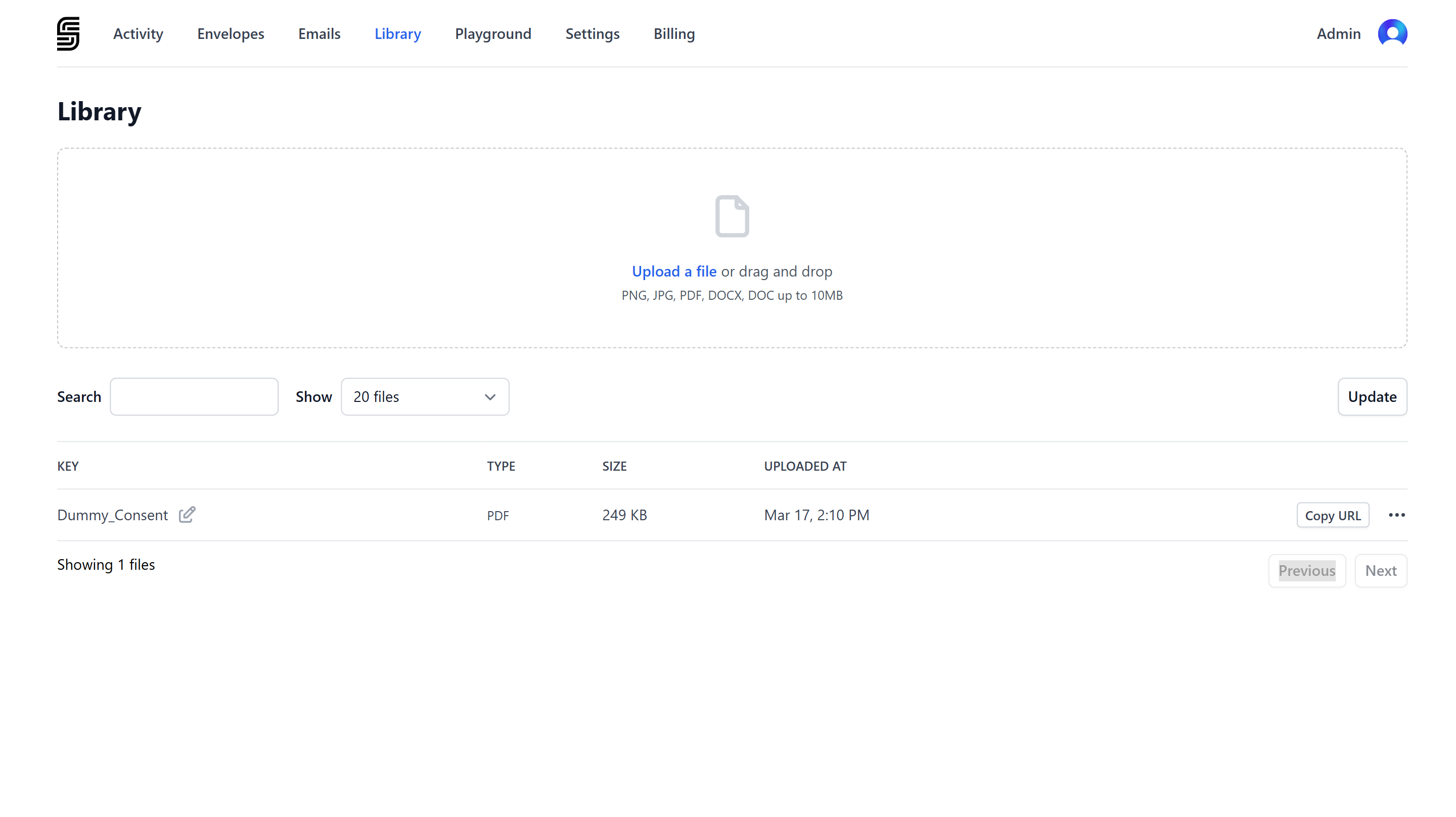 Click **Upload a file** or drag and drop your file, then confirm the upload. Click **Copy URL** to copy the file URL.
Use the URL in your document definition:
```json theme={null}
// POST https://api.signatureapi.com/v1/envelopes
// X-API-Key: key_test_...
// Content-Type: application/json
{
"title": "Service Agreement",
"documents": [
{
"url": "https://api.signatureapi.com/v1/uploads/upl_7kWstHtxXmje18omrlV6OA#agreement-v1",
"format": "pdf"
//...
}
],
"recipients": [
//...
]
//...
}
```
## Upload via API
Use the [Create Upload](/docs/api/resources/uploads/create) endpoint to upload files programmatically.
API uploads are temporary and intended for immediate use. To reuse a file, upload it to your Library in the Dashboard instead.
The response from the Create Upload endpoint includes a `url` property. Use it as the document URL:
```json theme={null}
// POST https://api.signatureapi.com/v1/envelopes
// X-API-Key: key_test_...
// Content-Type: application/json
{
"title": "Service Agreement",
"documents": [
{
"url": "https://api.signatureapi.com/v1/uploads/upl_7kWstHtxXmje18omrlV6OA",
"format": "pdf"
//...
}
],
"recipients": [
//...
]
//...
}
```
## External Store
You can provide any publicly accessible URL. SignatureAPI downloads the file from the specified location.
Supported hosting services:
Use either pre-signed (recommended) or public URLs.
Accepted formats:
* `https://*.s3.*.amazonaws.com/*`
* `https://*.s3.amazonaws.com/*`
* `https://s3.amazonaws.com/*`
* `https://s3.*.amazonaws.com/*`
Use either pre-signed (recommended) or public URLs.
Accepted formats:
* `https://*.r2.dev/*`
* `https://*.r2.cloudflarestorage.com/*`
Use either pre-signed (recommended) or public URLs.
Accepted format:
* `https://*.blob.core.windows.net/*`
Use either pre-signed (recommended) or public URLs.
Accepted format:
* `https://storage.googleapis.com/*`
Ensure the file can be downloaded directly from the URL.
Accepted format:
* `https://*.public.blob.vercel-storage.com/*`
Use either pre-signed (recommended) or public URLs.
Accepted format:
* `https://*.supabase.co/*`
Ensure the file can be downloaded directly from the URL.
Accepted format:
* `https://drive.google.com/*`
Ensure the file can be downloaded directly from the URL.
Accepted format:
* `https://www.dropbox.com/*`
Ensure the file can be downloaded directly from the URL.
Accepted format:
* `https://*.convex.cloud/api/storage/*`
Ensure the file can be downloaded directly from the URL.
Accepted format:
* `https://*.cdn.bubble.io/*`
Want support for another source? [Contact support](mailto:support@signatureapi.com).
Click **Upload a file** or drag and drop your file, then confirm the upload. Click **Copy URL** to copy the file URL.
Use the URL in your document definition:
```json theme={null}
// POST https://api.signatureapi.com/v1/envelopes
// X-API-Key: key_test_...
// Content-Type: application/json
{
"title": "Service Agreement",
"documents": [
{
"url": "https://api.signatureapi.com/v1/uploads/upl_7kWstHtxXmje18omrlV6OA#agreement-v1",
"format": "pdf"
//...
}
],
"recipients": [
//...
]
//...
}
```
## Upload via API
Use the [Create Upload](/docs/api/resources/uploads/create) endpoint to upload files programmatically.
API uploads are temporary and intended for immediate use. To reuse a file, upload it to your Library in the Dashboard instead.
The response from the Create Upload endpoint includes a `url` property. Use it as the document URL:
```json theme={null}
// POST https://api.signatureapi.com/v1/envelopes
// X-API-Key: key_test_...
// Content-Type: application/json
{
"title": "Service Agreement",
"documents": [
{
"url": "https://api.signatureapi.com/v1/uploads/upl_7kWstHtxXmje18omrlV6OA",
"format": "pdf"
//...
}
],
"recipients": [
//...
]
//...
}
```
## External Store
You can provide any publicly accessible URL. SignatureAPI downloads the file from the specified location.
Supported hosting services:
Use either pre-signed (recommended) or public URLs.
Accepted formats:
* `https://*.s3.*.amazonaws.com/*`
* `https://*.s3.amazonaws.com/*`
* `https://s3.amazonaws.com/*`
* `https://s3.*.amazonaws.com/*`
Use either pre-signed (recommended) or public URLs.
Accepted formats:
* `https://*.r2.dev/*`
* `https://*.r2.cloudflarestorage.com/*`
Use either pre-signed (recommended) or public URLs.
Accepted format:
* `https://*.blob.core.windows.net/*`
Use either pre-signed (recommended) or public URLs.
Accepted format:
* `https://storage.googleapis.com/*`
Ensure the file can be downloaded directly from the URL.
Accepted format:
* `https://*.public.blob.vercel-storage.com/*`
Use either pre-signed (recommended) or public URLs.
Accepted format:
* `https://*.supabase.co/*`
Ensure the file can be downloaded directly from the URL.
Accepted format:
* `https://drive.google.com/*`
Ensure the file can be downloaded directly from the URL.
Accepted format:
* `https://www.dropbox.com/*`
Ensure the file can be downloaded directly from the URL.
Accepted format:
* `https://*.convex.cloud/api/storage/*`
Ensure the file can be downloaded directly from the URL.
Accepted format:
* `https://*.cdn.bubble.io/*`
Want support for another source? [Contact support](mailto:support@signatureapi.com).