> ## Documentation Index
> Fetch the complete documentation index at: https://signatureapi-daf4ee54.mintlify.site/llms.txt
> Use this file to discover all available pages before exploring further.
# Verify a Deliverable
> Verify the cryptographic signature on SignatureAPI PDF deliverables using public key certificates.
All SignatureAPI PDF deliverables are sealed with a cryptographic signature. You can verify that a deliverable was generated by SignatureAPI and has not been altered since it was issued.
The signature is created using one of these public key certificates:
| | |
| ------------------- | ------------------------------------------------------------------ |
| Serial Number | `0FE117EE6AF5B1EECC367D06D7845D17` |
| SHA-256 Fingerprint | `843AA9BB894A3C9956F6CD3F06E0D6E9E43F0A192849977F747F918A1C4F4F7E` |
| | |
| ------------------- | ------------------------------------------------------------------ |
| Serial Number | `2979AC8352AC3B82B72EAA318FFFA49D` |
| SHA-256 Fingerprint | `815B8B425132FEB359334E4589CC8C7FE78C3F6DC976AB403825DFAC4F0B8CA2` |
| | |
| ------------------- | ------------------------------------------------------------------ |
| Serial Number | `2E8766982802E57E49D02FA3907DCDCE` |
| SHA-256 Fingerprint | `CBD80A0B0B3F212C30590AF00DE75692D11CA9EA49C9B86FD82441BBB0A95BFA` |
| | |
| ------------------- | ------------------------------------------------------------------------------------------------- |
| Serial Number | `3C2A804C599D18452298B145296FD433` |
| SHA-256 Fingerprint | `1B:F6:EA:62:5A:52:E5:36:B2:D9:0F:DA:8B:28:0A:41:58:11:80:7D:4F:B9:24:25:3A:A2:E1:84:C1:30:CC:46` |
| | |
| ------------------- | ------------------------------------------------------------------ |
| Serial Number | `533ECFDBD0D3D876C4D452E2268A3F35` |
| SHA-256 Fingerprint | `DC0B3B18804DC36ECE893C4A4D1C03F156C1D14F5991599DD85DFB9F6D1F7F60` |
| | |
| ------------------- | ------------------------------------------------------------------ |
| Serial Number | `5DC2DACB8E8B3A32A387FBBED05FD79C` |
| SHA-256 Fingerprint | `0638C6E40EB36D081A1FF578BCDB26799C96716CE4C021F3DB9B9CDC79CB0497` |
## Verifying in Adobe Acrobat
The easiest way to verify a deliverable is to open it in Adobe Acrobat Reader (free) or Adobe Acrobat (paid).
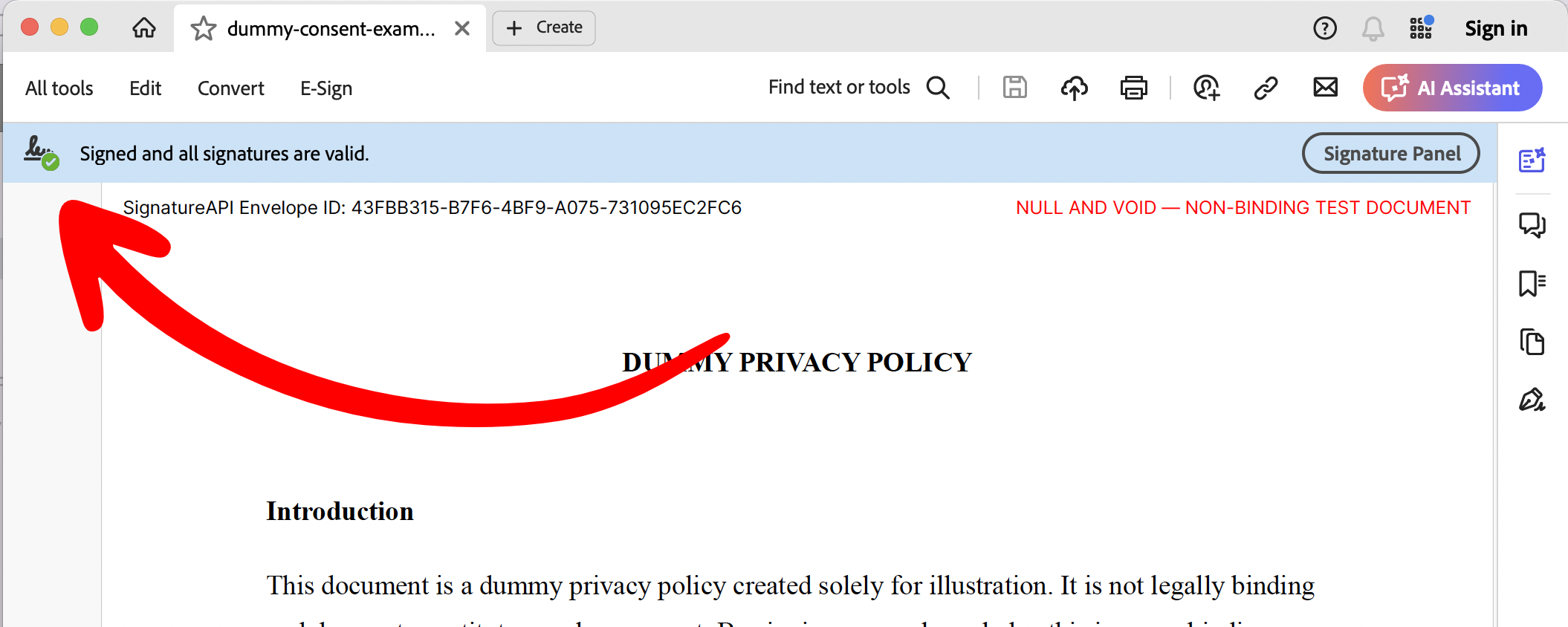
**Step 1: Check that the signature is valid.**
You should see a signature icon with a green check mark and the message "Signed and all signatures are valid."
 **Step 2: Open the Signature Panel.**
Click the signature panel to review the signer identity and confirm that the certificate matches one of the SignatureAPI certificates listed above. This confirms the deliverable was generated by SignatureAPI and has not been modified since it was sealed.
**Step 2: Open the Signature Panel.**
Click the signature panel to review the signer identity and confirm that the certificate matches one of the SignatureAPI certificates listed above. This confirms the deliverable was generated by SignatureAPI and has not been modified since it was sealed.