> ## Documentation Index
> Fetch the complete documentation index at: https://signatureapi-daf4ee54.mintlify.site/llms.txt
> Use this file to discover all available pages before exploring further.

# Email Link Authentication

> Authenticate recipients with a secure link sent to their email address.

With email link authentication, SignatureAPI sends the [recipient](/docs/api/resources/recipients/object) an email with a direct link. Clicking the link authenticates the recipient and opens their signing session.

This is the default authentication method. If you don't specify a ceremony configuration, SignatureAPI uses email link authentication automatically.

## When to use

Email link authentication works well when:

* You want the simplest experience for recipients.
* Recipients check email to access documents.
* You don't need to control the ceremony URL or deliver it through other channels.
* Your security requirements allow email-based authentication.

## Creating an email link ceremony

You can create an email link ceremony automatically when creating an envelope, or manually using the Create Ceremony endpoint.

### On envelope creation (automatic)

By default, SignatureAPI creates an email link ceremony and sends the invitation email when you create an envelope.

```json Default email link ceremony theme={null}
// POST https://api.signatureapi.com/v1/envelopes
// X-API-Key: key_test_...
// Content-Type: application/json

{
    "title": "Service Agreement",
    "recipients": [
        {
            "type": "signer",
            "key": "client",
            "name": "John Doe",
            "email": "john.doe@example.com"
        }
    ],
    "documents": [ /* ... */ ]
}
```

To add ceremony options such as a redirect URL, set the `ceremony` property explicitly.

```json Email link ceremony with redirect URL theme={null}
// POST https://api.signatureapi.com/v1/envelopes
// X-API-Key: key_test_...
// Content-Type: application/json

{
    "title": "Service Agreement",
    "recipients": [
        {
            "type": "signer",
            "key": "client",
            "name": "John Doe",
            "email": "john.doe@example.com",
            "ceremony": {
                "authentication": [
                    {
                        "type": "email_link"
                    }
                ],
                "redirect_url": "https://www.example.com/redirect"
            }
        }
    ],
    "documents": [ /* ... */ ]
}
```

### Create Ceremony endpoint (manual)

Use the [Create Ceremony](/docs/api/resources/ceremonies/create) endpoint to create an email link ceremony after the envelope is created.

<Note>
  Creating a new ceremony automatically revokes any previous ceremony for that recipient. Only the most recent ceremony remains active.
</Note>

```json Create email link ceremony theme={null}
// POST https://api.signatureapi.com/v1/recipients/{recipient_id}/ceremonies
// X-API-Key: key_test_...
// Content-Type: application/json

{
    "authentication": [
        {
            "type": "email_link"
        }
    ]
}
```

## Email customization

By default, SignatureAPI derives the email content from the envelope:

* Subject: `envelope.title`
* Message body: `envelope.message`
* Language: `envelope.language`

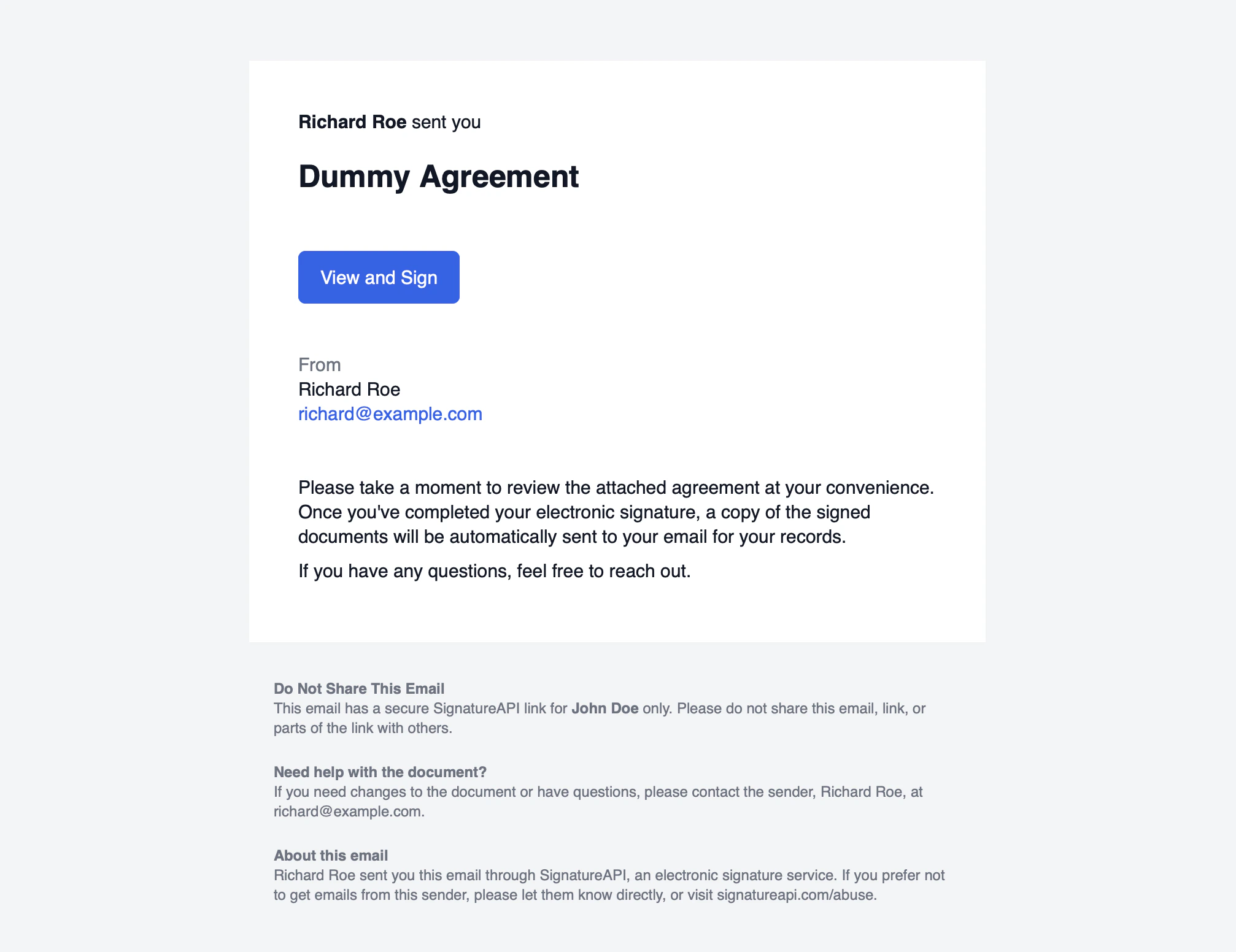
For example, an envelope with:

```json theme={null}
{
  "title": "Dummy Agreement",
  "message": "Please take a moment to review the attached agreement. Once you complete your electronic signature, a signed copy will be sent to your email.\n\nIf you have questions, feel free to reach out."
}
```

produces an email similar to this:

<Frame>
  <img src="https://mintcdn.com/signatureapi-daf4ee54/to2kcqhpCDnABjF5/docs/api/resources/ceremonies/authentication/email-example.png?fit=max&auto=format&n=to2kcqhpCDnABjF5&q=85&s=68b34e57aef59efa5b4ee0e60734465d" alt="" width="2014" height="1552" data-path="docs/api/resources/ceremonies/authentication/email-example.png" />
</Frame>

### Per-recipient overrides

Use `subject_override` and `message_override` on the `email_link` authentication object to customize the email for a specific recipient.

```json Per-recipient email customization theme={null}
// POST https://api.signatureapi.com/v1/envelopes
// X-API-Key: key_test_...
// Content-Type: application/json

{
    "title": "Service Agreement",
    "recipients": [
        {
            "type": "signer",
            "key": "client",
            "name": "John Doe",
            "email": "john.doe@example.com",
            "ceremony": {
                "authentication": [
                    {
                        "type": "email_link",
                        "subject_override": "Action Required: Please sign the Service Agreement",
                        "message_override": "Dear John,\n\nPlease review and sign the attached Service Agreement at your earliest convenience."
                    }
                ]
            }
        }
    ],
    "documents": [ /* ... */ ]
}
```

`message_override` supports Markdown formatting: `**bold**`, `*italic*`, and `\n\n` for paragraph breaks.

To send invitation emails through your own infrastructure with custom branding, use [Custom Authentication](/docs/api/resources/ceremonies/authentication/custom) to obtain the ceremony URL and deliver it yourself.

## Audit log

When a recipient clicks the email link, SignatureAPI records the timestamp. The audit log entry looks like this:

<div class="text-sm text-gray-500 border border-gray-200 rounded-md p-4 flex gap-8">
  <div class="flex-none">12/31/2025 11:59:59 PM</div>
  <div class="flex-1">John Doe (#7161cf07) has authenticated using a secure link sent to john⁠@example.com.</div>
</div>
