> ## Documentation Index
> Fetch the complete documentation index at: https://signatureapi-daf4ee54.mintlify.site/llms.txt
> Use this file to discover all available pages before exploring further.
# Set Up Webhooks
> Receive real-time event notifications from SignatureAPI in your own backend
Webhooks let you receive real-time notifications when events happen in your SignatureAPI account, such as when a recipient signs, an envelope completes, or an email bounces. Instead of polling the API, SignatureAPI sends an HTTP `POST` request to your endpoint each time an event occurs.
## Create a Webhook Endpoint
Webhook endpoints are registered in the Dashboard. You can create separate endpoints for [test and live](/docs/api/test-mode) modes, and choose which event types each endpoint receives.
Go to [Dashboard > Settings > Webhooks](https://dashboard.signatureapi.com/settings/webhooks) and click **Add endpoint**.
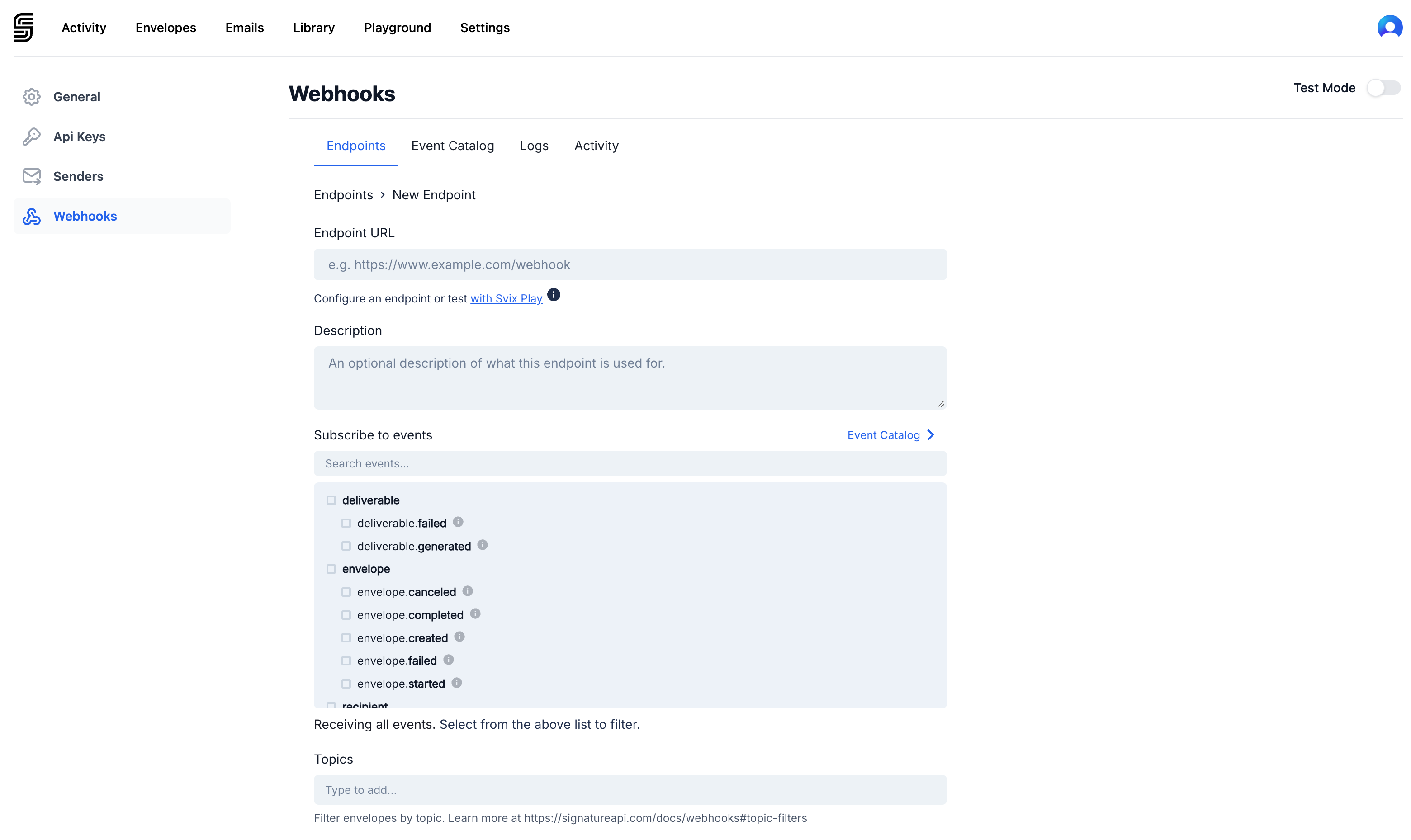 Enter the URL of your webhook endpoint, select the events you want to receive, and save. You can subscribe to individual event types or receive all events.
Webhooks are scoped to the mode you are currently viewing in the Dashboard. Make sure you are in the correct mode (test or live) before creating your endpoint.
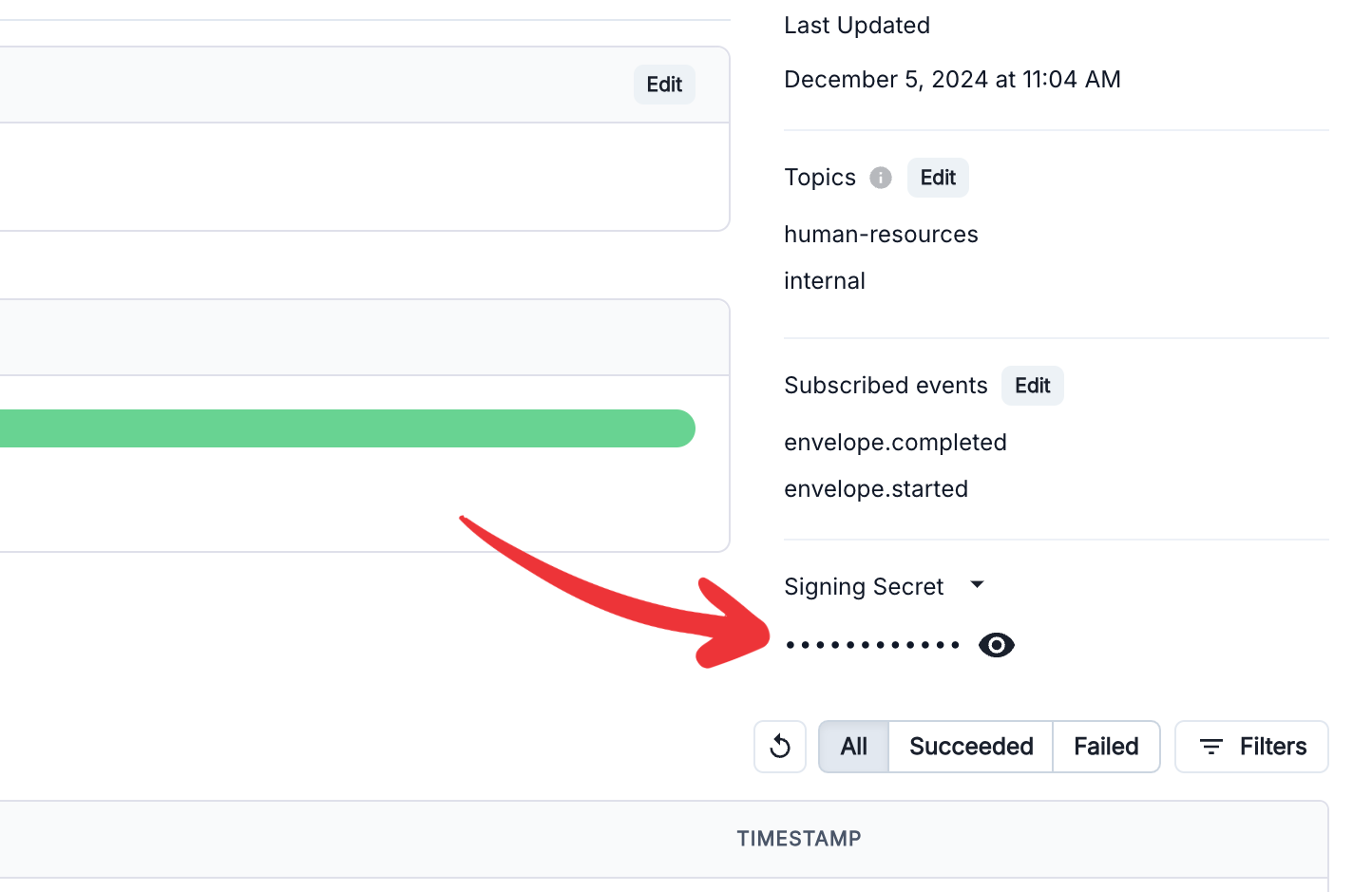
After saving, copy the **Signing Secret** from the right column of your endpoint definition. You will use this to verify that incoming requests are from SignatureAPI.
Enter the URL of your webhook endpoint, select the events you want to receive, and save. You can subscribe to individual event types or receive all events.
Webhooks are scoped to the mode you are currently viewing in the Dashboard. Make sure you are in the correct mode (test or live) before creating your endpoint.
After saving, copy the **Signing Secret** from the right column of your endpoint definition. You will use this to verify that incoming requests are from SignatureAPI.
 ## Webhook Payload
When an event occurs, SignatureAPI sends a `POST` request to your endpoint with the [Event object](/docs/api/resources/events/object) as the JSON body.
Here is an example payload for a `recipient.completed` event:
```json theme={null}
{
"id": "evt_4p2oouvNvjp1I9ckgqycH2",
"type": "recipient.completed",
"timestamp": "2025-12-31T15:00:01.999Z",
"data": {
"object_id": "re_7v7Sion0vqjJioYmwfZ9mf",
"object_type": "recipient",
"envelope_id": "e387553d-cbb7-4924-abd8-b2d89699e9b5",
"envelope_metadata": {
"deal_id": "50055",
"deal_owner": "Jane C."
},
"recipient_type": "signer",
"recipient_key": "client"
}
}
```
Every event includes a top-level `id`, `type`, and `timestamp`, along with a `data` object whose shape depends on the event type. The `envelope_metadata` property reflects any custom metadata you attached to the envelope when creating it.
Some common event types:
| Event type | When it fires |
| ------------------------ | ------------------------------------------------------------ |
| `envelope.created` | A new envelope is created |
| `envelope.started` | The envelope finishes processing and recipients are notified |
| `envelope.completed` | All recipients have completed the envelope |
| `envelope.canceled` | The envelope is explicitly canceled |
| `recipient.completed` | A recipient finishes their signing step |
| `recipient.soft_bounced` | A notification email to a recipient bounced |
For the full list of event types, see [Envelope Events](/docs/api/resources/events/envelope-events), [Recipient Events](/docs/api/resources/events/recipient-events), [Deliverable Events](/docs/api/resources/events/deliverable-events), and [Sender Events](/docs/api/resources/events/sender-events).
## Verify the Signature
Every webhook request includes a `webhook-signature` header. You should always verify this header to confirm the request came from SignatureAPI and was not tampered with.
SignatureAPI follows the [Standard Webhooks specification](https://github.com/standard-webhooks/standard-webhooks/blob/main/spec/standard-webhooks.md#verifying-webhook-authenticity) for signature verification. The Standard Webhooks project provides verification libraries for most languages, so you do not need to implement the HMAC logic yourself.
For example, to verify signatures in JavaScript or TypeScript:
```js theme={null}
import { Webhook } from "standardwebhooks"
const wh = new Webhook(signing_secret);
wh.verify(webhook_payload, webhook_headers);
```
Libraries are available for [JavaScript and TypeScript](https://github.com/standard-webhooks/standard-webhooks/tree/main/libraries/javascript), [Python](https://github.com/standard-webhooks/standard-webhooks/tree/main/libraries/python), [Java and Kotlin](https://github.com/standard-webhooks/standard-webhooks/tree/main/libraries/java), [Rust](https://github.com/standard-webhooks/standard-webhooks/tree/main/libraries/rust), [Go](https://github.com/standard-webhooks/standard-webhooks/tree/main/libraries/go), [Ruby](https://github.com/standard-webhooks/standard-webhooks/tree/main/libraries/ruby), [PHP](https://github.com/standard-webhooks/standard-webhooks/tree/main/libraries/php), [C#](https://github.com/standard-webhooks/standard-webhooks/tree/main/libraries/csharp), and [Elixir](https://github.com/standard-webhooks/standard-webhooks/tree/main/libraries/elixir).
Use the Signing Secret you copied from the Dashboard as the `signing_secret` value.
## Respond to Webhooks
Your endpoint must return a response with a status code in the `2XX` range (200 to 299) to acknowledge that the event was received successfully. Any other status code is treated as a failed delivery.
SignatureAPI does not guarantee the order of event delivery. Your endpoint should handle events arriving out of order.
If delivery fails, SignatureAPI will retry for up to 48 hours using an exponential backoff strategy. If your endpoint consistently fails over several days, the account owner will be notified and deliveries to that endpoint may be temporarily disabled.
## Filter by Topic
By default, your webhook endpoint receives events for all envelopes in the selected mode. If you need to route events from specific envelopes to a particular endpoint, use topic filters.
When creating an envelope, include up to 10 topics in the `topics` array of the [Envelope object](/docs/api/resources/envelopes/object). When configuring your webhook endpoint, specify the topics it should receive events for. Only envelopes tagged with a matching topic will trigger that endpoint.
Topic filters are not enabled by default. Contact [support@signatureapi.com](mailto:support@signatureapi.com) to enable this feature for your account.
## Testing
These tools are useful for testing your webhook setup before connecting a real backend:
* [Webhook.site](https://webhook.site): Generates a temporary endpoint URL and lets you inspect incoming `POST` requests in real time. Useful for verifying the payload structure.
* [ngrok](https://ngrok.com/): Creates a secure tunnel from a public URL to your local machine, so you can receive and process webhook events during local development.
## Keep Learning
* Review the [Webhooks reference](/docs/api/webhooks) for a complete overview of event delivery, retries, and authentication.
* Explore all [event types](/docs/api/resources/events/envelope-events) and their payloads.
* Learn about [test mode](/docs/api/test-mode) to safely develop and test your integration without affecting live data.
## Webhook Payload
When an event occurs, SignatureAPI sends a `POST` request to your endpoint with the [Event object](/docs/api/resources/events/object) as the JSON body.
Here is an example payload for a `recipient.completed` event:
```json theme={null}
{
"id": "evt_4p2oouvNvjp1I9ckgqycH2",
"type": "recipient.completed",
"timestamp": "2025-12-31T15:00:01.999Z",
"data": {
"object_id": "re_7v7Sion0vqjJioYmwfZ9mf",
"object_type": "recipient",
"envelope_id": "e387553d-cbb7-4924-abd8-b2d89699e9b5",
"envelope_metadata": {
"deal_id": "50055",
"deal_owner": "Jane C."
},
"recipient_type": "signer",
"recipient_key": "client"
}
}
```
Every event includes a top-level `id`, `type`, and `timestamp`, along with a `data` object whose shape depends on the event type. The `envelope_metadata` property reflects any custom metadata you attached to the envelope when creating it.
Some common event types:
| Event type | When it fires |
| ------------------------ | ------------------------------------------------------------ |
| `envelope.created` | A new envelope is created |
| `envelope.started` | The envelope finishes processing and recipients are notified |
| `envelope.completed` | All recipients have completed the envelope |
| `envelope.canceled` | The envelope is explicitly canceled |
| `recipient.completed` | A recipient finishes their signing step |
| `recipient.soft_bounced` | A notification email to a recipient bounced |
For the full list of event types, see [Envelope Events](/docs/api/resources/events/envelope-events), [Recipient Events](/docs/api/resources/events/recipient-events), [Deliverable Events](/docs/api/resources/events/deliverable-events), and [Sender Events](/docs/api/resources/events/sender-events).
## Verify the Signature
Every webhook request includes a `webhook-signature` header. You should always verify this header to confirm the request came from SignatureAPI and was not tampered with.
SignatureAPI follows the [Standard Webhooks specification](https://github.com/standard-webhooks/standard-webhooks/blob/main/spec/standard-webhooks.md#verifying-webhook-authenticity) for signature verification. The Standard Webhooks project provides verification libraries for most languages, so you do not need to implement the HMAC logic yourself.
For example, to verify signatures in JavaScript or TypeScript:
```js theme={null}
import { Webhook } from "standardwebhooks"
const wh = new Webhook(signing_secret);
wh.verify(webhook_payload, webhook_headers);
```
Libraries are available for [JavaScript and TypeScript](https://github.com/standard-webhooks/standard-webhooks/tree/main/libraries/javascript), [Python](https://github.com/standard-webhooks/standard-webhooks/tree/main/libraries/python), [Java and Kotlin](https://github.com/standard-webhooks/standard-webhooks/tree/main/libraries/java), [Rust](https://github.com/standard-webhooks/standard-webhooks/tree/main/libraries/rust), [Go](https://github.com/standard-webhooks/standard-webhooks/tree/main/libraries/go), [Ruby](https://github.com/standard-webhooks/standard-webhooks/tree/main/libraries/ruby), [PHP](https://github.com/standard-webhooks/standard-webhooks/tree/main/libraries/php), [C#](https://github.com/standard-webhooks/standard-webhooks/tree/main/libraries/csharp), and [Elixir](https://github.com/standard-webhooks/standard-webhooks/tree/main/libraries/elixir).
Use the Signing Secret you copied from the Dashboard as the `signing_secret` value.
## Respond to Webhooks
Your endpoint must return a response with a status code in the `2XX` range (200 to 299) to acknowledge that the event was received successfully. Any other status code is treated as a failed delivery.
SignatureAPI does not guarantee the order of event delivery. Your endpoint should handle events arriving out of order.
If delivery fails, SignatureAPI will retry for up to 48 hours using an exponential backoff strategy. If your endpoint consistently fails over several days, the account owner will be notified and deliveries to that endpoint may be temporarily disabled.
## Filter by Topic
By default, your webhook endpoint receives events for all envelopes in the selected mode. If you need to route events from specific envelopes to a particular endpoint, use topic filters.
When creating an envelope, include up to 10 topics in the `topics` array of the [Envelope object](/docs/api/resources/envelopes/object). When configuring your webhook endpoint, specify the topics it should receive events for. Only envelopes tagged with a matching topic will trigger that endpoint.
Topic filters are not enabled by default. Contact [support@signatureapi.com](mailto:support@signatureapi.com) to enable this feature for your account.
## Testing
These tools are useful for testing your webhook setup before connecting a real backend:
* [Webhook.site](https://webhook.site): Generates a temporary endpoint URL and lets you inspect incoming `POST` requests in real time. Useful for verifying the payload structure.
* [ngrok](https://ngrok.com/): Creates a secure tunnel from a public URL to your local machine, so you can receive and process webhook events during local development.
## Keep Learning
* Review the [Webhooks reference](/docs/api/webhooks) for a complete overview of event delivery, retries, and authentication.
* Explore all [event types](/docs/api/resources/events/envelope-events) and their payloads.
* Learn about [test mode](/docs/api/test-mode) to safely develop and test your integration without affecting live data.