> ## Documentation Index
> Fetch the complete documentation index at: https://signatureapi-daf4ee54.mintlify.site/llms.txt
> Use this file to discover all available pages before exploring further.
# Embed Signing in a Mobile App
> Embed the SignatureAPI signing interface in your mobile app using a WebView
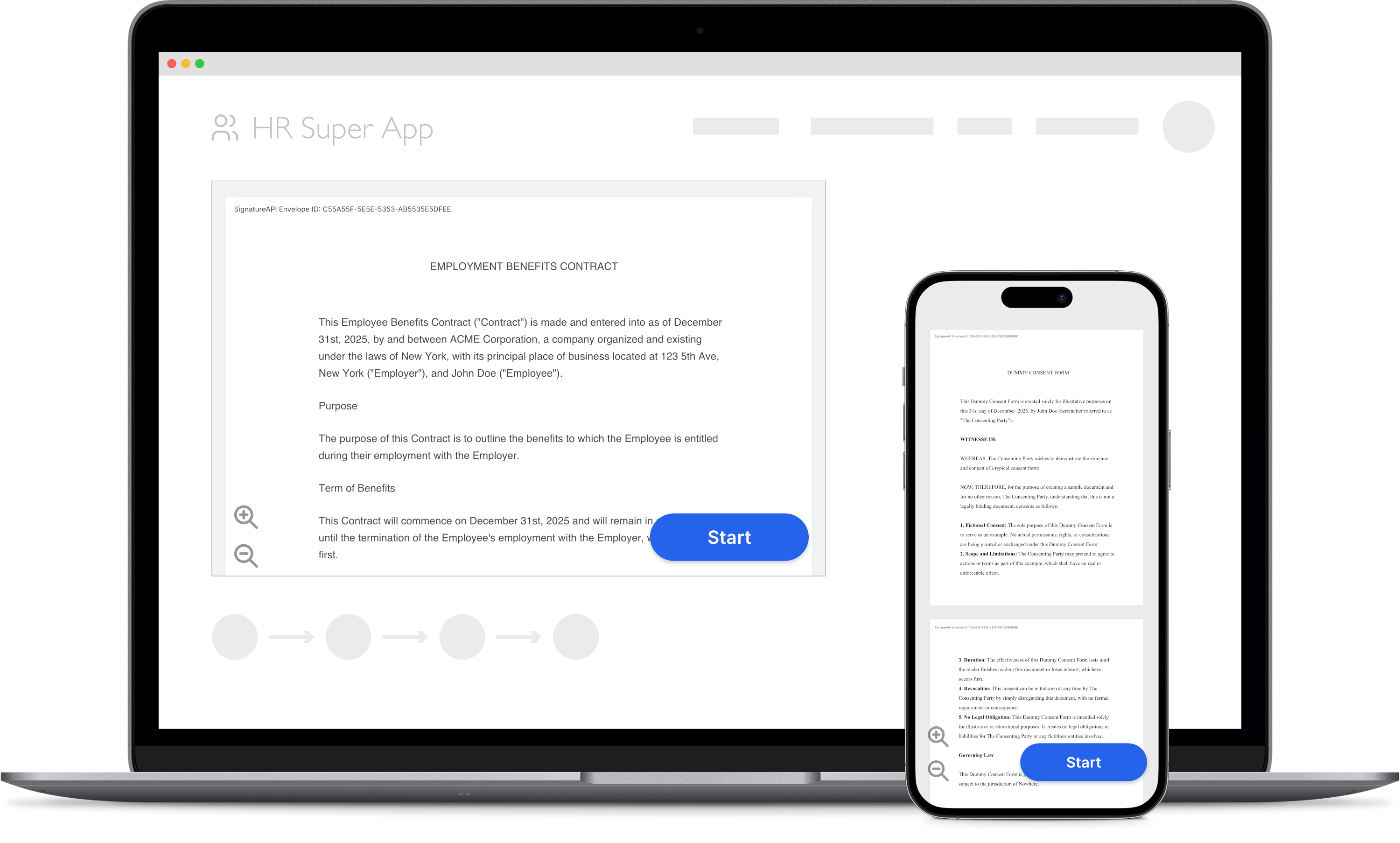 You can embed the signing interface directly in your mobile app using a WebView. The signer completes the ceremony inside your app without being redirected to an external browser.
You need both:
* A **server** to create an envelope and get a ceremony URL.
* A **client** (your mobile app) to display the ceremony to the recipient.
## Server Side
The server-side setup for mobile embedding is the same as for web embedding. Your server creates an envelope with a recipient whose ceremony uses [Custom Authentication](/docs/api/resources/ceremonies/authentication/custom), then returns the ceremony URL to your mobile app.
Follow the server-side steps in the [Embed Signing in a Web App](/docs/api/guides/how-to/embed-web) guide, then return here for the mobile-specific client implementation.
Never call the SignatureAPI API directly from your mobile app. Your API key would be exposed in the app bundle. Always fetch the ceremony URL from your own backend.
## Client Side (React Native)
### Install the WebView package
Install [react-native-webview](https://github.com/react-native-webview/react-native-webview):
```bash theme={null}
npm install react-native-webview
```
### Build the signing component
Create a `SignatureApiWebView` component that loads the ceremony and handles the terminal events: `ceremony.completed`, `ceremony.canceled`, and `ceremony.failed`.
Mobile apps use `event_delivery=redirect` instead of `event_delivery=message`. When the ceremony reaches a terminal state, the signing interface redirects the WebView to a `signatureapi-message://` URL. Your app intercepts that navigation and responds accordingly.
```tsx theme={null}
import React, { useCallback } from 'react';
import { WebView, WebViewNavigation } from 'react-native-webview';
interface SignatureApiWebViewProps {
ceremonyUrl: string;
}
export function SignatureApiWebView(props: SignatureApiWebViewProps) {
const { ceremonyUrl } = props;
const [showWebview, setShowWebview] = React.useState(true);
// Append query parameters to make the ceremony embeddable.
// Use event_delivery=redirect so events arrive as interceptable
// navigations rather than JavaScript messages.
const embeddedCeremonyUrl =
ceremonyUrl + '&embedded=true&event_delivery=redirect';
const handleNavigation = useCallback(
(navigationState: WebViewNavigation): void => {
try {
const parsedUrl = new URL(navigationState.url);
// Intercept signatureapi-message:// URLs
if (parsedUrl.protocol !== 'signatureapi-message:') return;
const eventType = parsedUrl.host;
switch (eventType) {
case 'ceremony.completed':
// The recipient finished signing
setShowWebview(false);
break;
case 'ceremony.canceled':
// The recipient canceled the ceremony
setShowWebview(false);
break;
case 'ceremony.failed':
// An error prevented the ceremony from completing
setShowWebview(false);
break;
default:
console.log(`Unhandled event: ${eventType}`);
}
} catch (error) {
console.error('Error handling navigation:', error);
}
},
[]
);
if (!showWebview) return null;
return (
);
}
```
### Use the component
Your app fetches the ceremony URL from your backend and passes it to the component:
```tsx theme={null}
// Fetch the ceremony URL from your backend, then render:
const ceremonyUrl =
'https://sign.signatureapi.com/en/start?token=eyJhbGciOiJFUzI1NiIsInR5cCI6IkpXVCJ9...';
;
```
### How events are delivered
When the ceremony ends, the signing interface issues a redirect to a `signatureapi-message://` URL. The `host` portion of the URL identifies the event type:
| URL | Event |
| ------------------------------------------- | -------------------------- |
| `signatureapi-message://ceremony.completed` | Recipient finished signing |
| `signatureapi-message://ceremony.canceled` | Recipient canceled |
| `signatureapi-message://ceremony.failed` | An error occurred |
For `ceremony.failed`, the URL includes `error_type` and `error_message` query parameters with details about the failure. See [Ceremony Events](/docs/embedded/ceremony-events) for the full reference.
## iOS and Android
Native iOS and Android apps follow the same pattern. Load the ceremony URL (with `embedded=true` and `event_delivery=redirect` appended) in a WebView, then intercept navigation to `signatureapi-message://` URLs to handle events.
* **iOS (WKWebView):** Implement `webView(_:decidePolicyFor:decisionHandler:)` in your `WKNavigationDelegate`. When the URL scheme is `signatureapi-message`, cancel the navigation and handle the event.
* **Android (WebView):** Override `shouldOverrideUrlLoading` in your `WebViewClient`. When the URL scheme is `signatureapi-message`, return `true` and handle the event.
## Try It
Use your [test API key](/docs/api/test-mode) to create a test envelope and ceremony. Test envelopes won't send emails, so you can iterate quickly without affecting real recipients. Review the results in your dashboard.
## Keep Learning
* Read the [Ceremony Events](/docs/embedded/ceremony-events) reference for the full list of event types and error codes.
* Learn how to [customize the signing ceremony](/docs/embedded/customization) to match your app's branding.
* See the full [React Native implementation](/docs/embedded/react-native) for additional options, such as hiding the cancel button.
* Explore [Custom Authentication](/docs/api/resources/ceremonies/authentication/custom) for details on the server-side ceremony setup required for embedding.
You can embed the signing interface directly in your mobile app using a WebView. The signer completes the ceremony inside your app without being redirected to an external browser.
You need both:
* A **server** to create an envelope and get a ceremony URL.
* A **client** (your mobile app) to display the ceremony to the recipient.
## Server Side
The server-side setup for mobile embedding is the same as for web embedding. Your server creates an envelope with a recipient whose ceremony uses [Custom Authentication](/docs/api/resources/ceremonies/authentication/custom), then returns the ceremony URL to your mobile app.
Follow the server-side steps in the [Embed Signing in a Web App](/docs/api/guides/how-to/embed-web) guide, then return here for the mobile-specific client implementation.
Never call the SignatureAPI API directly from your mobile app. Your API key would be exposed in the app bundle. Always fetch the ceremony URL from your own backend.
## Client Side (React Native)
### Install the WebView package
Install [react-native-webview](https://github.com/react-native-webview/react-native-webview):
```bash theme={null}
npm install react-native-webview
```
### Build the signing component
Create a `SignatureApiWebView` component that loads the ceremony and handles the terminal events: `ceremony.completed`, `ceremony.canceled`, and `ceremony.failed`.
Mobile apps use `event_delivery=redirect` instead of `event_delivery=message`. When the ceremony reaches a terminal state, the signing interface redirects the WebView to a `signatureapi-message://` URL. Your app intercepts that navigation and responds accordingly.
```tsx theme={null}
import React, { useCallback } from 'react';
import { WebView, WebViewNavigation } from 'react-native-webview';
interface SignatureApiWebViewProps {
ceremonyUrl: string;
}
export function SignatureApiWebView(props: SignatureApiWebViewProps) {
const { ceremonyUrl } = props;
const [showWebview, setShowWebview] = React.useState(true);
// Append query parameters to make the ceremony embeddable.
// Use event_delivery=redirect so events arrive as interceptable
// navigations rather than JavaScript messages.
const embeddedCeremonyUrl =
ceremonyUrl + '&embedded=true&event_delivery=redirect';
const handleNavigation = useCallback(
(navigationState: WebViewNavigation): void => {
try {
const parsedUrl = new URL(navigationState.url);
// Intercept signatureapi-message:// URLs
if (parsedUrl.protocol !== 'signatureapi-message:') return;
const eventType = parsedUrl.host;
switch (eventType) {
case 'ceremony.completed':
// The recipient finished signing
setShowWebview(false);
break;
case 'ceremony.canceled':
// The recipient canceled the ceremony
setShowWebview(false);
break;
case 'ceremony.failed':
// An error prevented the ceremony from completing
setShowWebview(false);
break;
default:
console.log(`Unhandled event: ${eventType}`);
}
} catch (error) {
console.error('Error handling navigation:', error);
}
},
[]
);
if (!showWebview) return null;
return (
);
}
```
### Use the component
Your app fetches the ceremony URL from your backend and passes it to the component:
```tsx theme={null}
// Fetch the ceremony URL from your backend, then render:
const ceremonyUrl =
'https://sign.signatureapi.com/en/start?token=eyJhbGciOiJFUzI1NiIsInR5cCI6IkpXVCJ9...';
;
```
### How events are delivered
When the ceremony ends, the signing interface issues a redirect to a `signatureapi-message://` URL. The `host` portion of the URL identifies the event type:
| URL | Event |
| ------------------------------------------- | -------------------------- |
| `signatureapi-message://ceremony.completed` | Recipient finished signing |
| `signatureapi-message://ceremony.canceled` | Recipient canceled |
| `signatureapi-message://ceremony.failed` | An error occurred |
For `ceremony.failed`, the URL includes `error_type` and `error_message` query parameters with details about the failure. See [Ceremony Events](/docs/embedded/ceremony-events) for the full reference.
## iOS and Android
Native iOS and Android apps follow the same pattern. Load the ceremony URL (with `embedded=true` and `event_delivery=redirect` appended) in a WebView, then intercept navigation to `signatureapi-message://` URLs to handle events.
* **iOS (WKWebView):** Implement `webView(_:decidePolicyFor:decisionHandler:)` in your `WKNavigationDelegate`. When the URL scheme is `signatureapi-message`, cancel the navigation and handle the event.
* **Android (WebView):** Override `shouldOverrideUrlLoading` in your `WebViewClient`. When the URL scheme is `signatureapi-message`, return `true` and handle the event.
## Try It
Use your [test API key](/docs/api/test-mode) to create a test envelope and ceremony. Test envelopes won't send emails, so you can iterate quickly without affecting real recipients. Review the results in your dashboard.
## Keep Learning
* Read the [Ceremony Events](/docs/embedded/ceremony-events) reference for the full list of event types and error codes.
* Learn how to [customize the signing ceremony](/docs/embedded/customization) to match your app's branding.
* See the full [React Native implementation](/docs/embedded/react-native) for additional options, such as hiding the cancel button.
* Explore [Custom Authentication](/docs/api/resources/ceremonies/authentication/custom) for details on the server-side ceremony setup required for embedding.